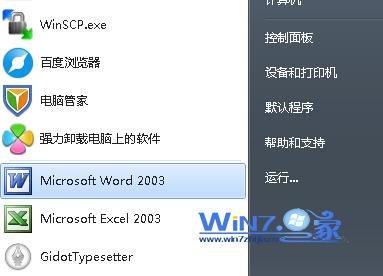
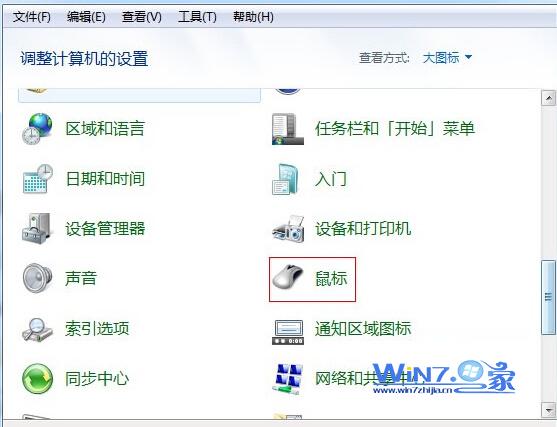
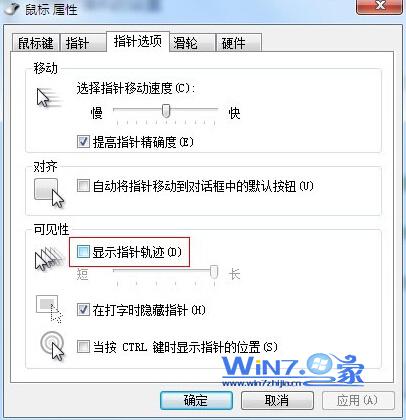
此功能原為螢幕投影/教學方便追蹤游標設計,日常使用會造成視覺干擾,關閉即可恢復乾淨游標。
Win7 禁止 USB 隨身碟使用:登錄修改 USBSTOR Start 值為 4 實現禁用
九大細節對比 XP/Vista/Windows 7:安裝流程與磁碟佔用實測
Windows 7 善用系統還原點找回遺失檔案:啟用磁碟保護與建立還原點教學
Win7 系統最低硬體需求與建議配備完整對照表
重裝系統後網頁無聲音 (本地正常)?登錄檔補回 wavemapper=msacm32.drv 修復
Windows 7 用戶願望清單洩露:IE 改進成最大呼聲
Win7 開機啟動項怎麼設定?msconfig 與安全軟體雙管齊下優化教學
Win7 如何設定預設輸入法?開機直接用慣用輸入法教學