Windows XP Windows 7 Windows 2003 Windows Vista Windows 綜合教學 Linux 系統教學
Windows 10 Windows 8 Windows 2008 Windows NT Windows Server 電腦軟體教學

Win7 安裝 Flash 提示「憑證驗證失敗」?刪除 IE 不受信任發行者中的 Adobe 憑證即解

編輯:Windows 7 系統介紹

錯誤原因

IE 憑證存儲中「不受信任的發行者」清單殘留 Adobe 舊憑證,導致新版安裝程式簽章驗證失敗。

修復步驟

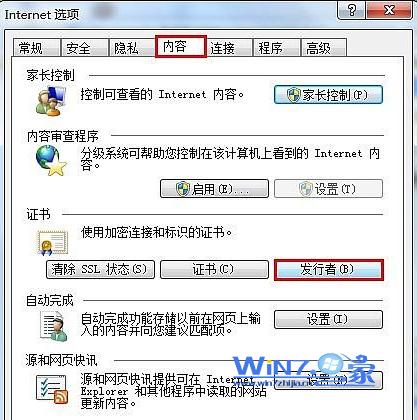
  1. 開啟 IE → 「工具」→「網際網路選項」。
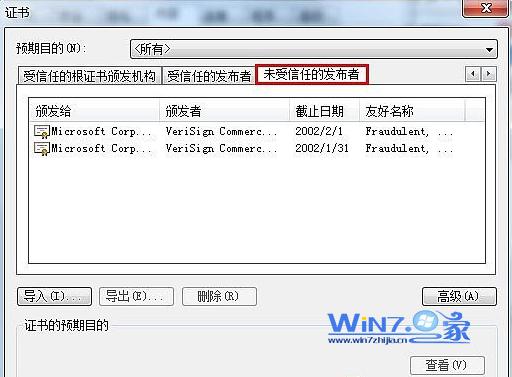
  2. 「內容」頁籤 → 「憑證」按鈕 → 「不受信任的發行者」頁籤。
  3. 找到 Adobe Systems Incorporated 相關憑證 → 選中 → 「移除」。
  4. 重新執行 Flash 安裝程式,驗證通過可正常安裝。

IE 網際網路選項內容頁籤

不受信任發行者移除 Adobe

補充

  • 現代瀏覽器已內建 Flash/HTML5,建議直接使用 Edge/Chrome/Firefox 避免獨立安裝 Flash。
  • 若仍需 Flash,請從 Adobe 官網下載最新版。
Copyright © Windows教程網 All Rights Reserved