Windows XP Windows 7 Windows 2003 Windows Vista Windows 綜合教學 Linux 系統教學
Windows 10 Windows 8 Windows 2008 Windows NT Windows Server 電腦軟體教學

Windows 7 為磁碟機設定自訂背景圖片 (Desktop.ini 技巧)

編輯:Windows 7 系統介紹

原理

在磁碟機根目錄建立 Desktop.ini 系統檔案,指定背景圖片路徑,Windows 檔案總管讀取後以該圖片為該磁碟機視窗背景。

操作步驟

  1. 準備喜歡的圖片 (建議 JPG, ≤ 256 KB),放在磁碟機根目錄 (如 D:\background.jpg)。
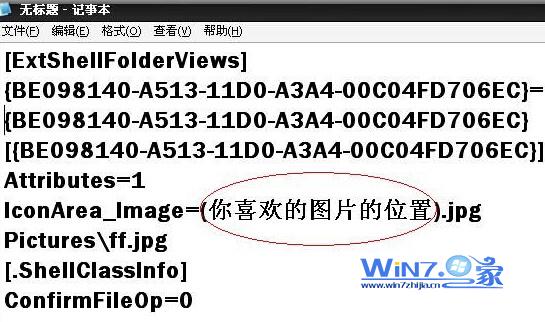
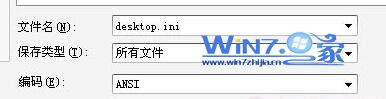
  2. 桌面右鍵 → 「新增」 → 「文字文件」,命名為 Desktop.ini (注意副檔名為 .ini,非 .txt),用記事本編輯貼上:
[ExtShellFolderViews]
{BE098140-A513-11D0-A3A4-00C04FD706EC}={BE098140-A513-11D0-A3A4-00C04FD706EC}

[{BE098140-A513-11D0-A3A4-00C04FD706EC}]
Attributes=1
IconArea_Image=D:\background.jpg
  1. 儲存後,將檔案屬性設為「系統」+「隱藏」 (命令提示字元):
    attrib +s +h D:\Desktop.ini
  2. 重新整理或重新開啟該磁碟機視窗,背景圖片生效。

建立 Desktop.ini 內容
另存為 ini 格式
磁碟機自訂背景效果

注意事項

  • 圖片路徑需為絕對路徑,且圖片檔案不可移動/刪除,否則背景消失。
  • 僅影響「資料夾視窗」背景,不影響桌面背景。
  • 若要取消,刪除 Desktop.ini 並重新整理。
  • 此技巧適用 Windows XP/7/8/10/11。
Copyright © Windows教程網 All Rights Reserved