問題現象
系統彈出「記憶體讀寫錯誤」、「Instruction at 0x... referenced memory at 0x... could not be read」等視窗,程式隨機崩潰。
根本原因
Windows Management Instrumentation (WMI) 服務異常/死結,導致系統管理查詢失敗,觸發記憶體存取違規。
修復步驟
- 右鍵桌面「電腦」 → 管理。
- 左側展開 服務和應用程式 → 服務。
- 右側找到 Windows Management Instrumentation,雙擊開啟屬性。
- 按 停止 按鈕,等待服務停止完成。
- 重新開機 (服務啟動類型為「自動」,重開機會自動啟動)。
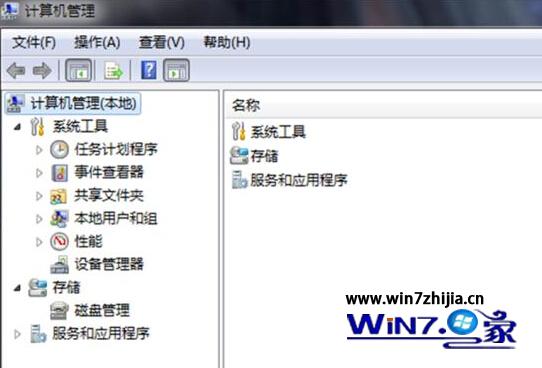 圖 1:開啟服務管理員
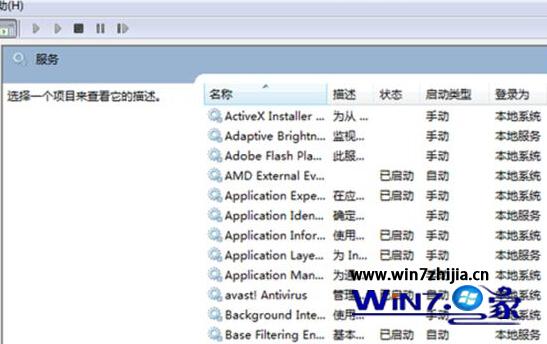 圖 2:找到 Windows Management Instrumentation 服務
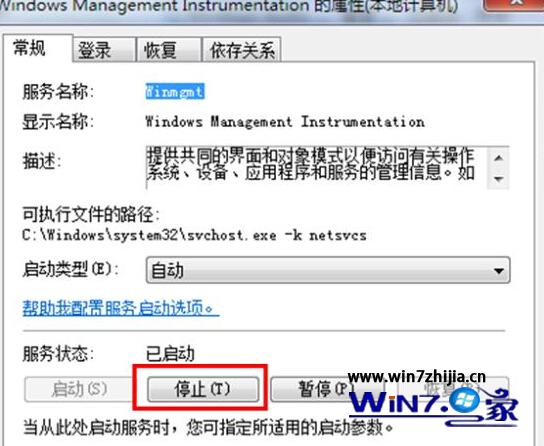 圖 3:按下停止並重開機
進階:若重開機後仍錯誤
- 以系統管理員身分開啟命令提示字元,執行:
winmgmt /resetrepository
重建 WMI 儲存庫 (需停止 WMI 服務後執行,或安全模式執行)。
- 執行
sfc /scannow 修復系統檔案。
- 檢查記憶體硬體:
mdsched.exe (Windows 記憶體診斷) 重開機測試。
- 若為特定軟體觸發 (如防毒、監控軟體),嘗試更新或暫時解除安裝該軟體驗證。
預防建議
- 避免安裝多套即時掃描防毒軟體,易導致 WMI 衝突。
- 定期執行
sfc /scannow 維護系統完整性。
- 保持 Windows Update 更新,修補 WMI 相關已知漏洞。