Windows XP Windows 7 Windows 2003 Windows Vista Windows 綜合教學 Linux 系統教學
Windows 10 Windows 8 Windows 2008 Windows NT Windows Server 電腦軟體教學

Win7 Excel 插入超連結報「由於本機限制」?登錄修正 .html 檔案關聯為 Htmlfile 解決

編輯:Windows 7 系統介紹

Excel 插入超連結彈出「由於本機限制,無法開啟該檔案」?原因是 .html 檔案關聯被竄改。登錄 HKEY_CURRENT_USER\Software\Classes\.html 預設值改為 Htmlfile 即可恢復正常超連結插入。

修復步驟

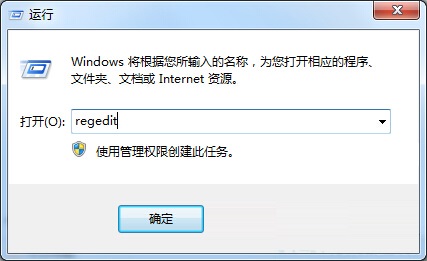
  1. Win+R → regedit。
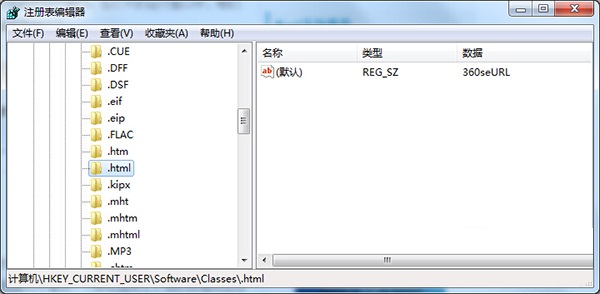
  2. 定位 HKEY_CURRENT_USER\Software\Classes\.html。
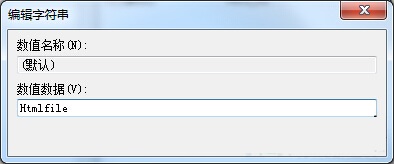
  3. 右側「預設」值雙擊 → 數值資料改為 Htmlfile → 確定。

開啟登錄編輯器

修改 .html 預設值為 Htmlfile

確認修改完成

成因:第三方瀏覽器/編輯器安裝時搶佔 .html 關聯,導致 Office 內部呼叫 ShellExecute 失敗。修正關聯後 Excel/Word/PowerPoint 插入超連結即刻恢復正常。


Copyright © Windows教程網 All Rights Reserved