Windows XP Windows 7 Windows 2003 Windows Vista Windows 綜合教學 Linux 系統教學
Windows 10 Windows 8 Windows 2008 Windows NT Windows Server 電腦軟體教學

Win7 PowerPoint 2003 出現「無法更正的錯誤」?停用 ppt reader add-in 附加元件修復

編輯:Windows 7 系統介紹

PowerPoint 2003 啟動報錯「無法更正的錯誤」?主因是 ppt reader add-in 附加元件損壞。重啟 PPT → 提示「上次載入附加元件發生嚴重錯誤,是否停用?」→ 選「是」停用;或手動:「說明」→「關於 Microsoft Office PowerPoint」→「停用的項目」→ 選中 ppt reader add-in → 「是」確認停用。

修復流程

  1. 重新啟動電腦 → 開啟 PowerPoint 2003。
  2. 出現提示:「上次開啟附加元件 'ppt reader add-in' 時發生嚴重錯誤。是否停用該附加元件?」→ 點擊「是」。
  3. 若未提示:選單「說明」→「關於 Microsoft Office PowerPoint」→ 「停用的項目」按鈕。
  4. 勾選 ppt reader add-in → 「是」→ 關閉對話框 → 重新啟動 PPT。
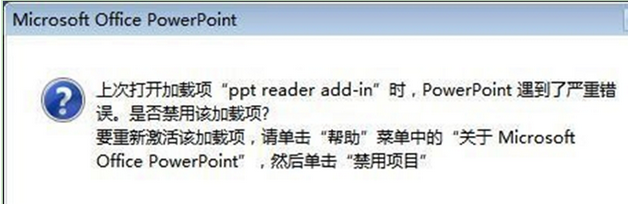
PowerPoint 錯誤提示

補充:此附加元件常由第三方 PDF 轉 PPT 工具安裝。若需該功能,請重新安裝對應工具;若不需,永久停用即可。Office 2007/2010/2013+ 版本請在「檔案」→「選項」→「附加元件」→「管理: COM 附加元件」→「前往」→ 取消勾選對應項目。

Copyright © Windows教程網 All Rights Reserved