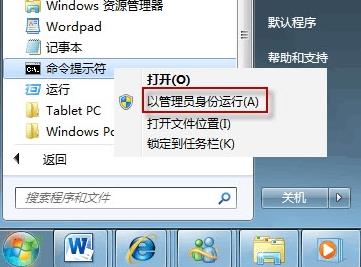
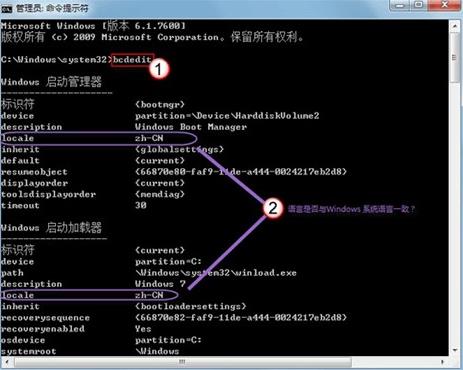
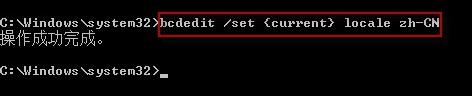
Win7 開機畫面顯示語言與系統語言不符(如顯示英文介面但系統為中文),可透過 bcdedit 修正開機載入器的 locale 參數恢復正常。
bcdedit
locale
zh-CN
bcdedit /set {current} locale zh-CN
適用情境:多語言版本安裝、語言包安裝順序錯誤、BCD 設定異常導致開機語言不匹配。
Windows 7 設定無線網路自動連線教學
Win7 無線網路分享 (ICS) 完整設定:主機分享有線網路給從機無線上網
Win7 攝影機影像倒轉/倒立完整排查:驅動錯誤為主因、四大成因與三級解決方案
XP 用戶升級 Windows 7 不如換新電腦?分析師建議直接購買預裝新機
Win7 無法開啟休眠功能?「拒絕存取」錯誤修復教學
Win7「Group Policy Client 服務未登入」錯誤修復:登錄檔權限修正教學
3G 上網共享實戰:筆記本 + 3G 網卡/手機 建立無線熱點
Windows 7 批次檔大全:一鍵清理垃圾、修復圖片緩存、重啟 Explorer、關機、NTFS 轉換...