微軟近期釋出所有 Windows 10 版本的激活方式說明,涵蓋從 Win7/Win8.1 升級裝置、Microsoft Store 購買授權、零售盒裝版等多種管道。Win10 引入全新「數位授權」機制,將授權綁定硬體裝置,使部分情況無需產品金鑰即可自動激活。
各版本激活方式對照
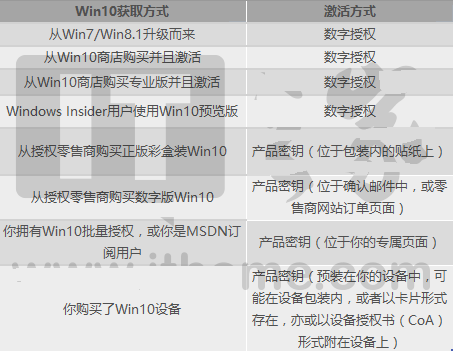
無需產品金鑰 (採數位授權自動激活)
- Win7/Win8.1 (免費升級期內) 升級至 Win10
- Microsoft Store 購買家庭版/專業版
- 家庭版升級專業版
- Windows Insider 預覽版
首次激活需輸入產品金鑰
- 零售盒裝版
- 數位下載版
- 大量授權 / MSDN 訂閱
- 購買預裝 Win10 的新裝置
重新安裝說明
根據微軟政策,裝置首次激活成功後,後續重新安裝同版本 Win10 可自動連網激活,無需重複輸入金鑰。數位授權綁定主機板硬體 ID,換機需重新購買授權。
實用建議
- 升級前記錄原版本產品金鑰備份
- Microsoft Store 購買記錄可於「訂單歷程」查看
- 大量授權環境建議使用 KMS/ADBA 激活