Windows XP Windows 7 Windows 2003 Windows Vista Windows 綜合教學 Linux 系統教學
Windows 10 Windows 8 Windows 2008 Windows NT Windows Server 電腦軟體教學

Win10 將區域連線設為「依流量計費」:登錄檔修改 DefaultMediaCost 禁用自動更新下載

編輯:Win10 系統基礎知識

Win10 預設不允許乙太網路設為依流量計費。修改登錄檔實現,後果:Windows Update 不自動下載、Store 應用不自動更新 (可在 Store 內單獨設定):

操作步驟 (先建立還原點)

  1. Win+R 輸入 regedit。
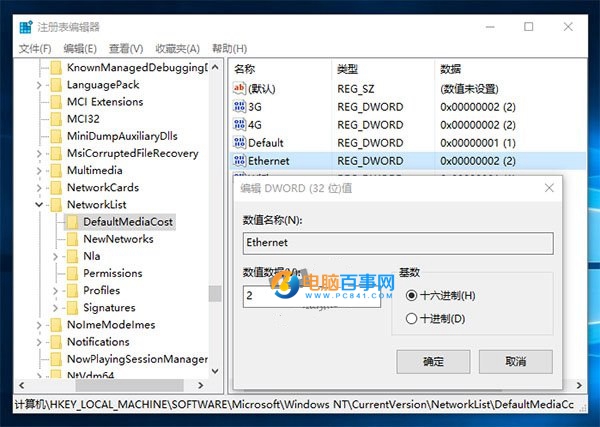
  2. 展開 HKEY_LOCAL_MACHINE\SOFTWARE\Microsoft\Windows NT\CurrentVersion\NetworkList\DefaultMediaCost。
  3. 取得 DefaultMediaCost 子鍵管理員權限 (參考「移除總管 OneDrive 圖示」教程取權法)。
  4. 右側找到 Ethernet,雙擊將數值改為 2 (1=不計費、2=計費)。
  5. 重開機生效,乙太網路即標記為依流量計費。

適合討厭強制自動更新、流量有限的用戶。需謹慎操作登錄檔與取權。

Copyright © Windows教程網 All Rights Reserved