Win10 音量滑桿無反應、設定裡音量開關無法開啟?登錄檔補回 systray.exe 自啟項修復:
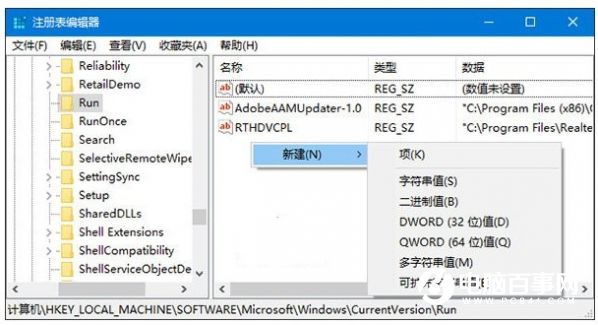
regedit
HKEY_LOCAL_MACHINE\SOFTWARE\Microsoft\Windows\CurrentVersion\Run
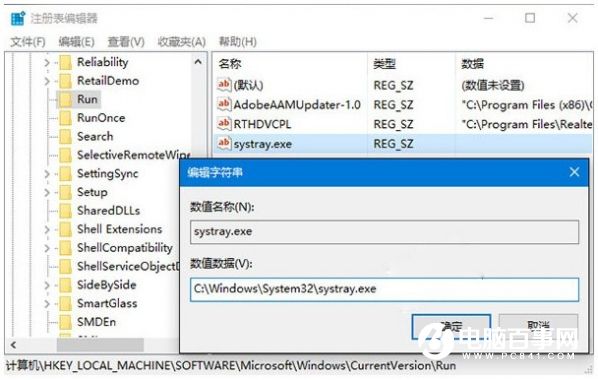
systray.exe
C:\Windows\System32\systray.exe
核心原因:systray.exe 系統匣圖示程式未隨開機啟動,補回 Run 鍵值即可修復。
Win10 怎麼檢查更新?控制台 Windows Update 手動檢測安裝更新完整步驟
Win10 桌面怎麼顯示「這台電腦」?一鍵找回我的電腦圖示
Win10 Build 10049 藍畫面怎麼辦?兩招快速解決桌面局部藍屏問題
Win10 如何還原到 Win7/Win8.1?回滾條件與完整操作教學
Win10 如何關閉「Windows 錯誤報告服務」?提升開機速度、節省硬碟空間
Lumia 950 XL 如何變身電腦?Continuum 模式連接螢幕完整教學
Win10 應用程式商店在哪裡?兩種快速開啟 Microsoft Store 方法
Win10 將 Edge 設為預設瀏覽器教程:設定 → 系統 → 預設應用程式 三步搞定