安裝 Win10 後 C 槽空間常告不足,推薦使用 Acronis Disk Director 11 Home 進行無損擴充:
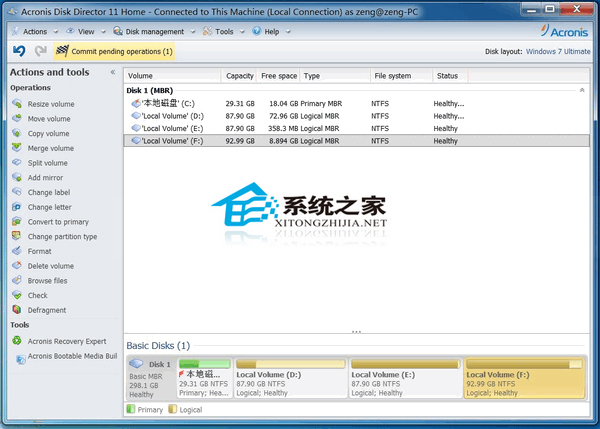
操作步驟
- 執行軟體,右鍵點擊 C 槽(Win10 系統盤),選「Resize volume(調整磁碟區大小)」。
- 勾選「Append all unallocated disk space to the volume(追加所有未配置磁碟空間)」與「Take free space from other volumes(從其他磁碟區取得可用空間)」。
- 設定欲擴充大小(即從其他分區調取空間),點擊「Volume size」確認執行。
Acronis Disk Director 11 Home 介面雖為英文,但操作直觀,功能強大且能保障資料安全,是調整磁碟分區的優選工具。