Windows XP Windows 7 Windows 2003 Windows Vista Windows 綜合教學 Linux 系統教學
Windows 10 Windows 8 Windows 2008 Windows NT Windows Server 電腦軟體教學

Windows 10 KB3081424 更新安裝失敗解決方案三選一

編輯:Win10 系統應用技巧

Windows 10 累積更新 KB3081424 安裝失敗、無限重啟、反覆安裝,微軟暫無官方修正,提供三種社群整理解法:

方法一:手動下載獨立安裝包安裝

前往 Microsoft Update Catalog 搜尋 KB3081424,下載對應架構 .msu 檔,以系統管理員身分執行安裝,多數可成功。

方法二:清理登錄殘留設定檔(同 .NET 3.5 錯誤 0x80070003 邏輯)

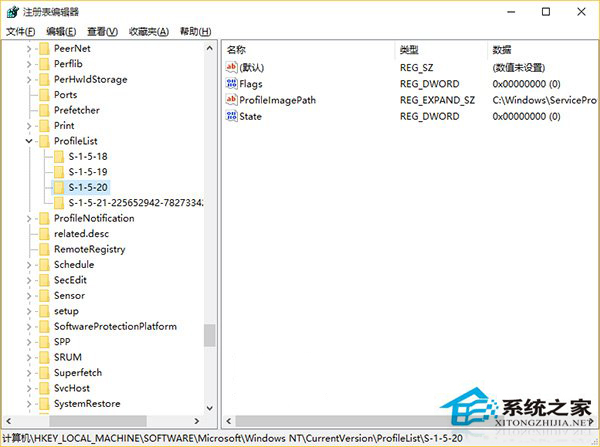
  1. 開啟登錄編輯器,導航至:
    HKEY_LOCAL_MACHINE\SOFTWARE\Microsoft\Windows NT\CurrentVersion\ProfileList
  2. 保留 S-1-5-18、19、20、S-1-5-21-...(當前使用者),刪除其他舊帳戶殘留項目。
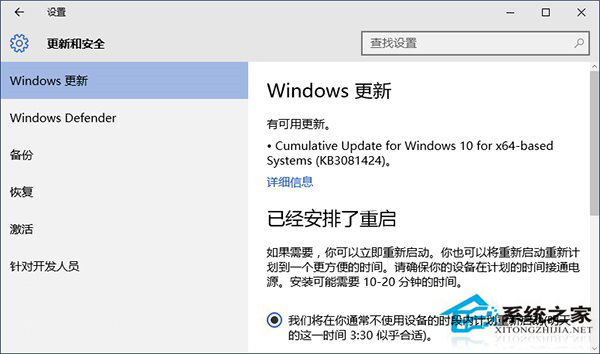
KB3081424 安裝失敗

ProfileList 登錄清理

方法三:使用一鍵修復工具修復系統檔案

下載「軟媒魔方」→ 「軟媒電腦醫生」 → 「一鍵修復」 → 點擊「修復」,等待掃描修復完成(需較長時間),部分用戶反饋可解決。
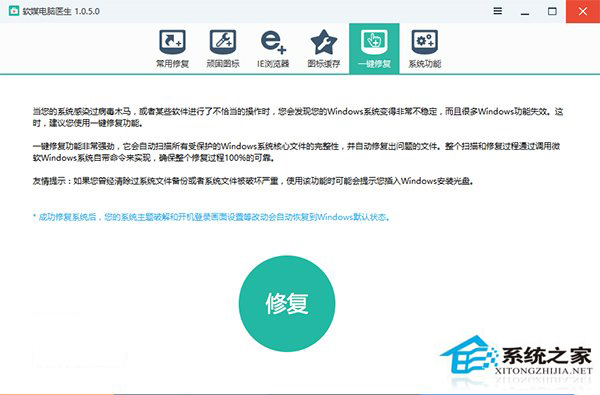
一鍵修復工具

建議依序嘗試方法一 → 方法二 → 方法三。修改登錄有風險,不確定請勿操作,等待官方修正更新。

Copyright © Windows教程網 All Rights Reserved