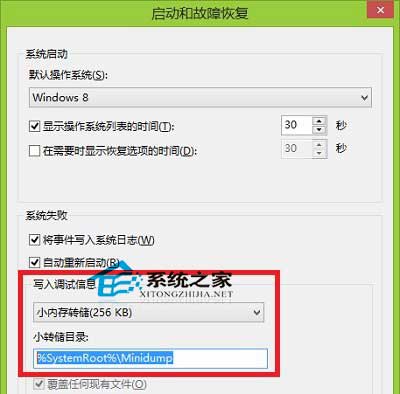
系統藍畫面會產生記憶體傾印檔,分析這些檔案可找出崩潰原因。Win10 中三種傾印檔儲存位置如下:
可在 Windows 目錄搜尋 `*.dmp` 快速找出所有傾印檔。分析工具建議使用 WinDbg 或 BlueScreenView。詳細修復請參考《電腦藍畫面怎麼解決》專題。
Win10 恢復檔案總管「收藏夾」功能(註冊表法)
微軟暢想 Win10 UWP 未來:HoloLens、IoT、跨設備統一、開發一次全端運行
Win10 登入密碼忘記怎麼辦?Microsoft 帳號重設密碼完整教學
Win10 缺少 boot.wim 檔案升級失敗怎麼解決?
Windows 10 將滑鼠左鍵改為右鍵功能的設定教學(左撇子福音)
Windows 10 命令提示字元全螢幕顯示模式啟用教學
Windows 8 突然停止工作(非當機)修復方法:重新整理/重設電腦
Win10 使用 Microsoft 帳號無法存取共用印表機?在認證管理員新增 Windows 認證解決權限問題