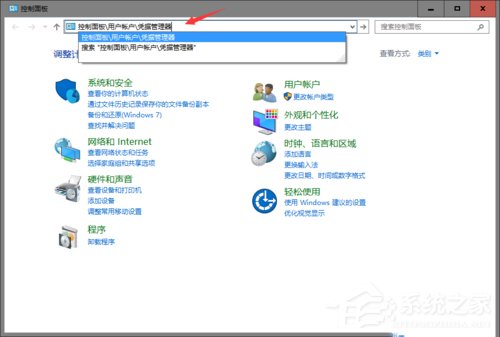
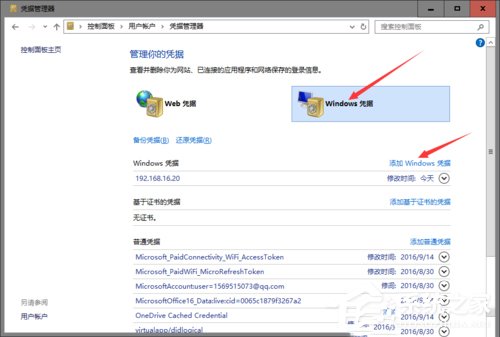
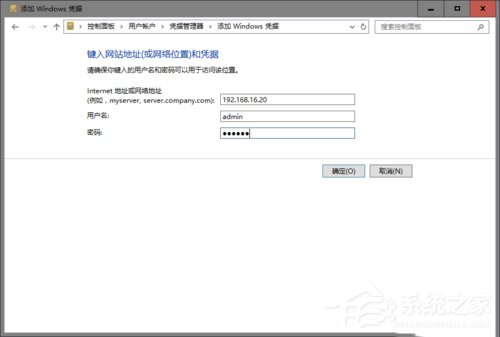
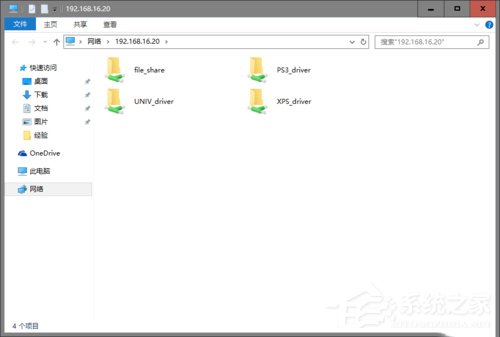
Windows 10 使用 Microsoft 帳號 (線上帳號) 存取匿名共用的印表機資料夾會提示「沒有權限使用網路資源」。解決方法是在「認證管理員」手動新增目標裝置的 IP、管理員帳號密碼 (如 admin) 即可通過驗證。
control /name Microsoft.CredentialManager
\\192.168.16.20
此為 Microsoft 帳號與匿名共用之間的驗證機制差異所致。
Win10 桌面壁紙尺寸不符導致變形?用美圖秀秀裁切至螢幕解析度完美適配
Win10 各版本免費啟用金鑰分享
Win10 桌面回收站圖示刪不掉?改用「隱藏」達到同樣效果
Win10 使用 DISM 指令查詢可升級版本:一鍵顯示目標版本資訊
Win10 設定無法開啟解決方案:微軟官方緊急修復工具掃描診斷自動修復 Issue 67758
Win10 升級後原裝軟體全保留:免費升級不影響已安裝程式,僅耗時較長
Win10 預覽版啟用正式版金鑰永久激活教學
Win 10 禁用 Win+ 快速鍵教學:自訂 DisabledHotkeys 避免熱鍵衝突