Windows XP Windows 7 Windows 2003 Windows Vista Windows 綜合教學 Linux 系統教學
Windows 10 Windows 8 Windows 2008 Windows NT Windows Server 電腦軟體教學

Windows 10 企業版下載安裝指南:微軟官網 ISO 映像檔取得完整流程

編輯:Win10 系統應用技巧

Windows 10 企業版 (Enterprise) 針對大型組織提供 AppLocker、DirectAccess、BranchCache、Windows To Go、長期服務通道 (LTSC) 等進階功能。官方下載流程如下。

下載步驟

  1. 瀏覽微軟官網 https://www.microsoft.com/evalcenter/ 或 Volume Licensing Service Center (VLSC,需授權帳號)。
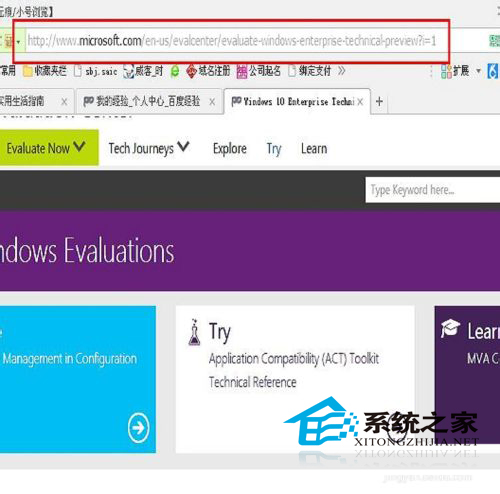
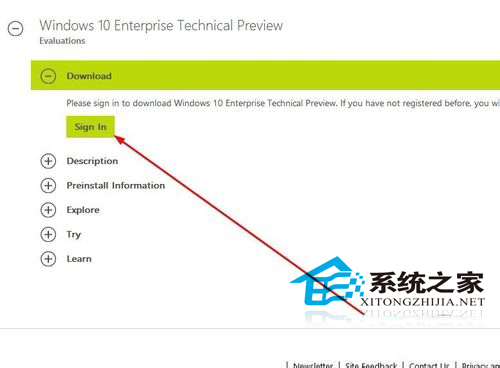
  2. 尋找「Windows 10 Enterprise Evaluation」或「Windows 10 Enterprise LTSC Evaluation」。
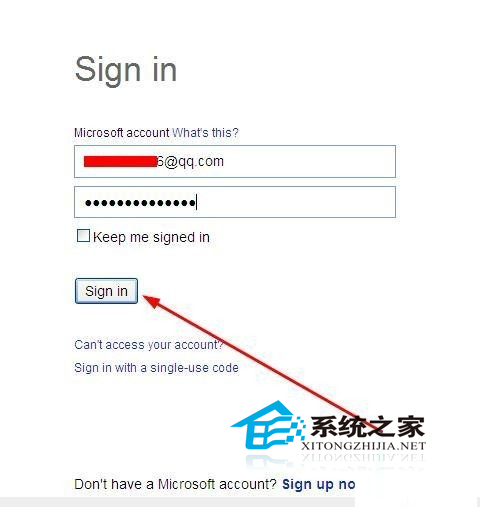
  3. 點擊「Sign in」使用 Microsoft Account (MSA) 或 Azure AD 組織帳號登入。
  4. 輸入帳號密碼登入後,選擇語言 (中文/英文等)、版本 (64-bit/32-bit)、下載方式 (ISO/媒體建立工具)。
  5. 下載 ISO 映像檔,使用 Rufus/Windows USB/DVD Download Tool 燒錄啟動 USB 安裝。

注意:評估版 (Evaluation) 為 90 天試用,到期後需輸入企業版產品金鑰或重新安裝。生產環境請透過 VLSC 下載正式版 ISO 並使用 MAK/KMS 授權。國內鏡像站 (MSDN I Tell You、Hellod 等) 亦提供驗證過 SHA256 的官方原版 ISO,下載前請核對雜湊值確保檔案完整。

Copyright © Windows教程網 All Rights Reserved