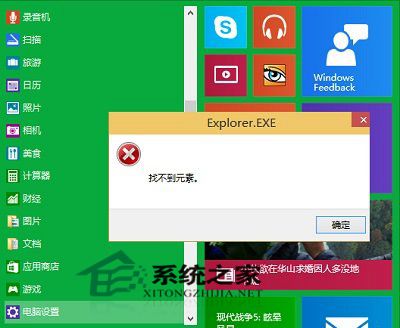
部分使用者回報開啟設定、商店或相容模式安裝程式時跳出 explorer.exe 找不到元素 錯誤。暫時解法:
explorer.exe 找不到元素
預覽版 Bug 眾多,切換開始模式可重設 Explorer 介面狀態,多數情況下可解決此錯誤。
Windows 10 桌面顯示異常?驅動人生 6 全面檢測修復驅動完美解決
Windows 10 升級 C 盤空間不足?官方內建 U盤/外接硬碟擴充方案
Win10 預覽版 10525 開機黑屏解決方案:關閉 Secure Boot 或停用獨顯
Windows 10 啟動小娜的兩種方式:語音喚醒與鍵盤快速鍵
Win10 商店應用無法聯網?重設網路、改 DNS、重置商店
Win10 安裝、關閉與解除安裝「遠端伺服器管理工具」 (RSAT) 完整指南
電腦管家 Win10 檢測顯示記憶體小於 2GB 解決:檢查 BIOS 啟用 CPU PAE/NX/SSE2 或更換硬體
Win10 IE 無法開啟 HTML/HTM 檔案?Internet 選項「設定關聯」恢復 IE 為預設開啟程式