磁碟效能影響系統使用效率,Win10 內建磁碟錯誤檢查與磁碟重組工具,助您維護磁碟健康。操作步驟如下:
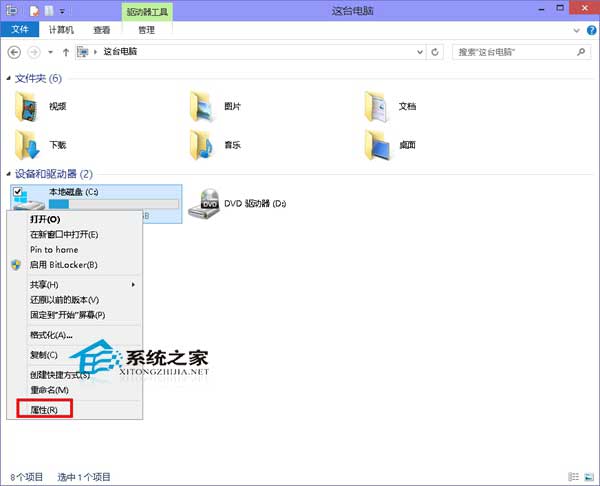
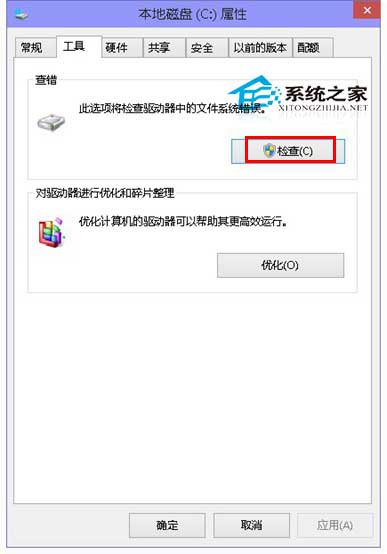
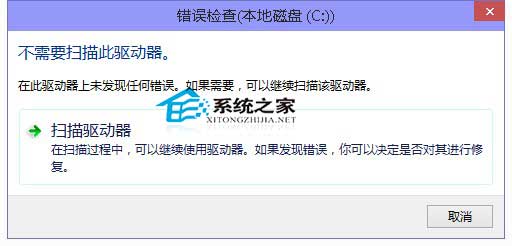
雖固態硬碟普及後磁碟錯誤檢查需求降低,但作為 Windows 內建系統工具,仍具備維護價值,建議定期執行。
Win10 AMD 顯卡「應用程式設定模式」導致停止運作?驅動更新與相容性排查指南
Xbox/Win10 夏季大促 7月5日開啟:250+遊戲最低4折,《量子破碎》《戰爭機器》參與
Windows 10 設定或取消開機登入密碼完整教學(含 netplwiz 進階法)
驅動人生推出 Windows 10 在線檢測升級功能:一鍵評估硬體相容、預載驅動
Windows 10 磁碟 100% 佔用?卸載 Intel RST 驅動程式嘗試緩解
Win10 Edge 瀏覽器如何移除百度搜尋引擎?進階設定更改網址列搜尋提供者