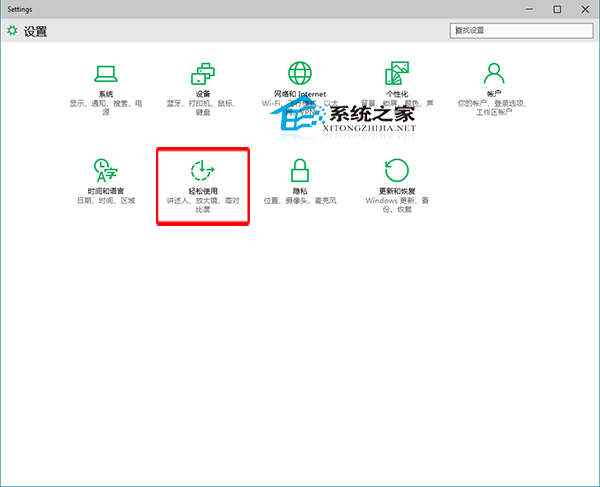
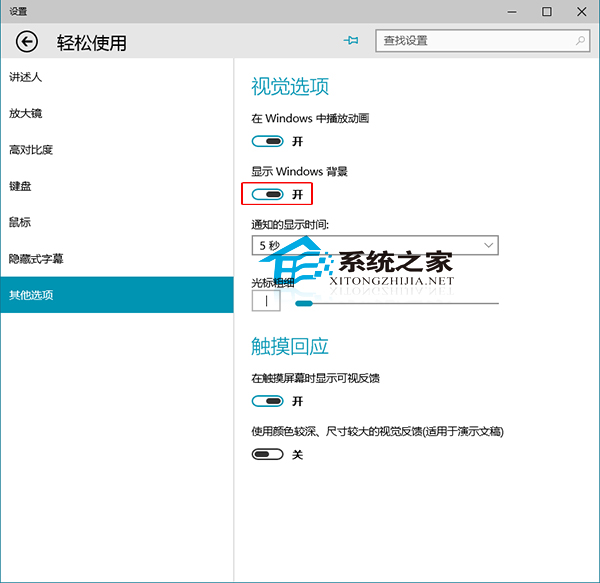
Windows 10 桌面背景變黑且無法設定?可能是「不顯示 Windows 背景」選項被開啟。
Windows 10 也支援純色背景,免去下載圖片麻煩。
Windows 10 設定允許應用程式通過防火牆通訊的管理教學
Win10 儲存空間功能:多顆硬碟組建儲存池、鏡像/同位檢查保護資料不遺失
Windows XP 升級 Win 10 方案曝光 39.99 美元換正版家庭版
Windows 10 Setup.exe 命令列參數完整詳解 (自動化安裝部署)
Windows 10 音量控制恢復傳統直條樣式:登錄表啟用經典 MTCUVC
升級 Win10 保留照片與資料完整指南:選擇「保留個人檔案與應用程式」
Win10 升級後天翼校園客戶端無法撥號?改用系統內建 PPPoE 連線解決
Windows 10 設定開機密碼三種模式教學 (字元密碼、圖片密碼、PIN 碼)