Windows 10 更換頭像後,舊頭像會保留在設定頁面供快速切換。若不想保留歷程記錄,可手動刪除快取資料夾中的圖片檔案。
清除步驟
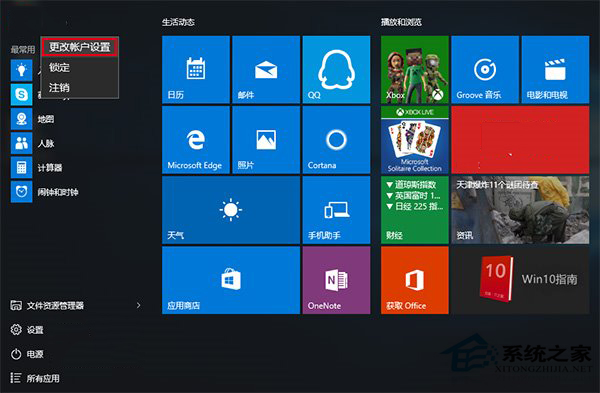
- 點擊「開始」按鈕 → 點擊頂端使用者頭像 → 選擇 「變更帳戶設定」。
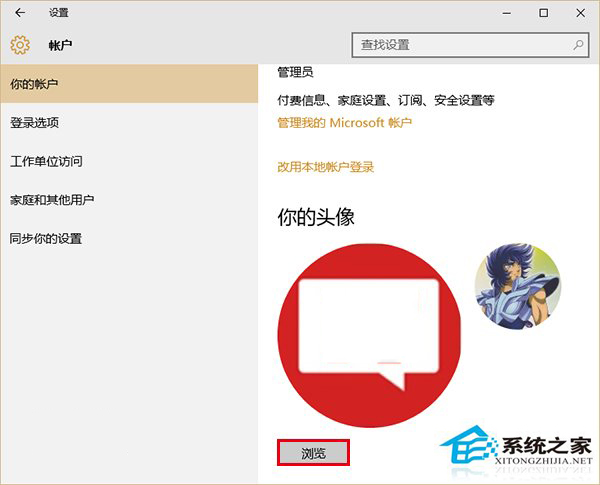
- 在「你的資訊」頁面,點擊 「瀏覽」 按鈕(在「建立你的相片」區塊)。
- 彈出的檔案選擇視窗中,點擊網址列(或按 Ctrl + L),輸入以下路徑並按 Enter:
%appdata%\Microsoft\Windows\AccountPictures
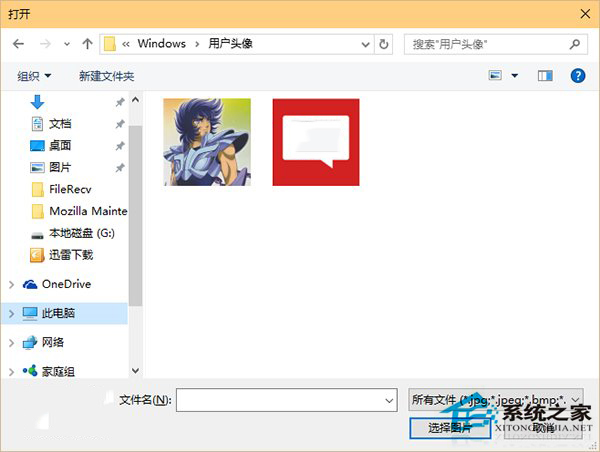
- 在開啟的資料夾中,刪除不想保留的舊頭像圖片檔案(右鍵 → 刪除)。目前正在使用的頭像不會被刪除。
此資料夾專門儲存頭像快取,刪除後在設定頁面將不再顯示該頭像選項。