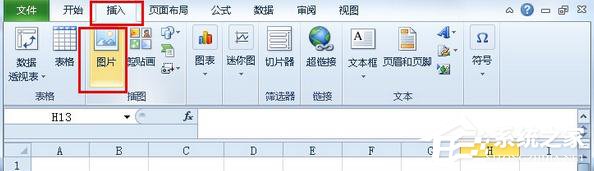
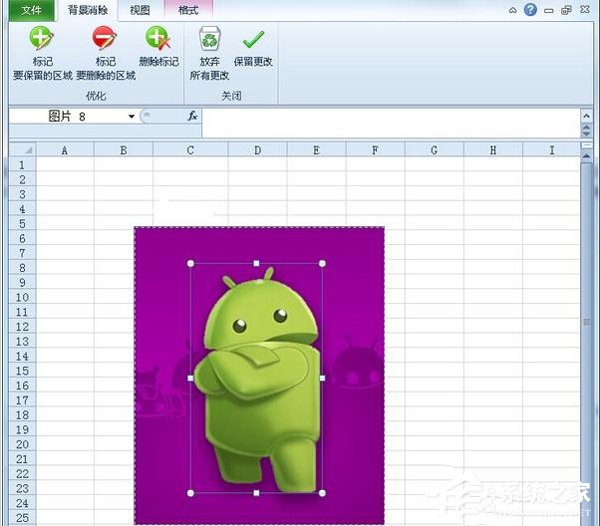
Office 2010 內建「移除背景」功能,Excel 2010 同樣可用。插入圖片後,選取圖片 → 「格式」索引標籤 → 「移除背景」 → 以滑鼠標記保留區域 (紫色為將移除) → 「保留變更」即可獲得透明背景圖片。
此功能同樣適用於 Word 2010、PowerPoint 2010。
Win10 設定預設瀏覽器:同 1373,設定 → 系統 → 預設應用程式統一管理
Win10 開始選單動態磚塊開關:右鍵磚塊「關閉即時磚塊」
Win10 進入安全模式:msconfig 圖形化設定法,免記複雜開機鍵
Windows 10 Windows Defender 無法啟動?卸載第三方殺毒後服務損壞修復指南
Win10 開機慢優化三大法:快速啟動、群組原則強制啟用、系統啟動項精簡與 CPU 核心全開
Windows 10 無限自動重開機怎麼解決?USB 開機進入修復環境修復啟動
Win10 錯誤碼 0x80072EFD?防火牆/安全軟體攔截更新與商店連線
Win10 判斷系統 32 位元還是 64 位元?兩步驟快速查看系統類型