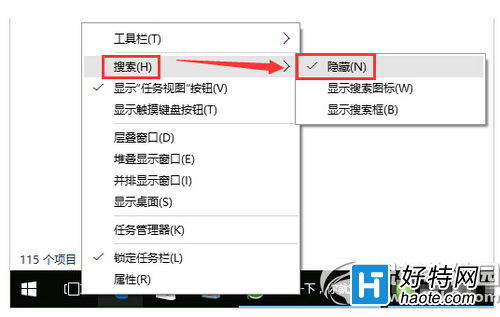
Windows 10 工作列預設顯示巨大的搜尋列佔據大量空間,若您習慣用 Win+S 或 Win+Q 呼叫搜尋,或單純想要更乾淨的工作列,可一鍵隱藏。
Win10 存儲空間功能詳解:多盤組建存儲池、自動備份、數據雙重保險
Win10 升級後黑屏/藍屏/無限重開機?三大解決方案完整圖文教學
Win10 筆電工作列不顯示電池/電源圖示?兩法修復:重新啟用電池驅動 或 開啟系統圖示開關
解決 Win10 網路卡被停用無法上網:網路連線啟用乙太網路
Win10 OneNote 插入表格教學:商務筆記整理利器
Win10 Microsoft Store 錯誤 0x80072EE7:修復 Hosts 檔案與網路連線
Win10 找回傳統控制台:登錄匯入右鍵選單「個人化選項」直達經典控制台項目
Win 10 專業版/企業版 KMS 啟用指令與通用金鑰彙整(含專業版 N、教育版等)