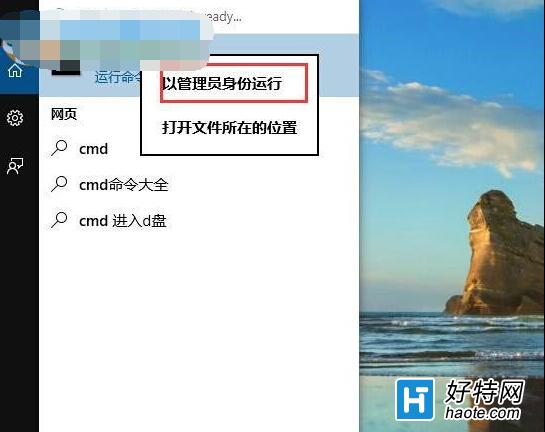
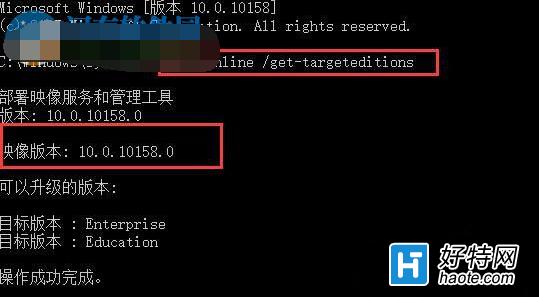
Win10 釋出多個版本(1507、1511、1607、1703...),若需確認目前安裝映像的確切版本編號(用於驅動相容性確認、企業部署驗證),可使用 DISM 指令快速查詢。
dism /online /get-targeteditions
替代方法:亦可在「設定」→「系統」→「關於」查看「版本」與「OS 組建」編號,或執行 winver 視窗查看。DISM 指令輸出較詳盡,適合腳本自動化擷取。
winver
Win10 磁碟分區怎麼做?磁碟管理壓縮卷建立新分區完整圖文教學
Win10 進入安全模式最快方法:msconfig 設定「安全開機」重啟即可,無需複雜選單操作
Windows 10 清除檔案總管「主頁」最近使用檔案與常用資料夾:設定法與註冊表法
Windows 10 回饋管道大全:讓微軟聽見你的聲音
Win10 找回傳統控制台:登錄匯入右鍵選單「個人化選項」直達經典控制台項目
Win10 USB 隨身碟寫入保護無法格式化?裝置管理員調整原則為「較佳效能」
曝光:疑似Win10旗艦Lumia 950拍照樣張:2000萬像素、改進光學防抖
Win10 安裝杜比音效驅動程式?Dolby Home Theater v4 完整安裝與避坑指南