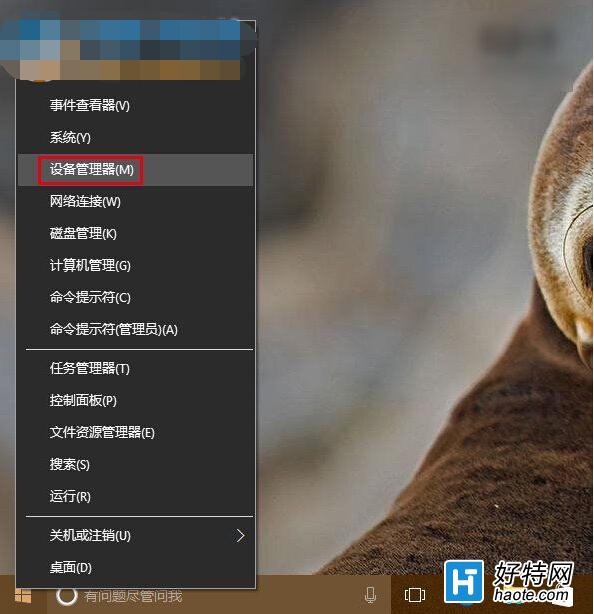
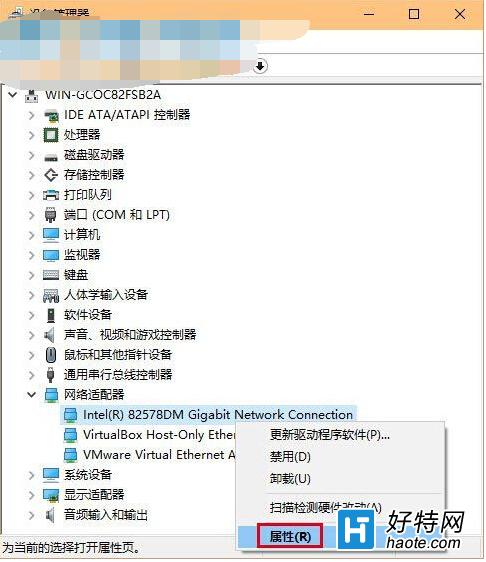
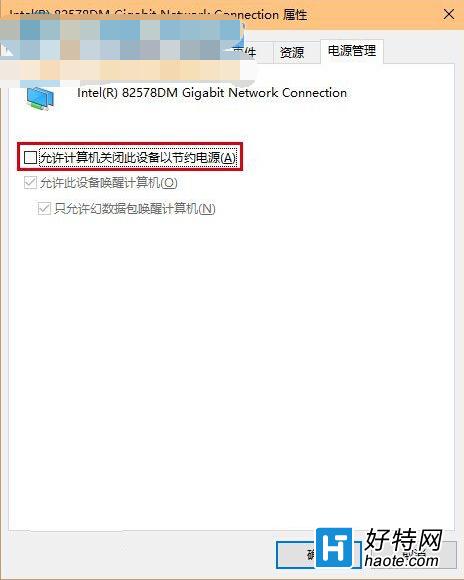
升級 Win10 後,部分用戶遭遇 WiFi/有線網路頻繁斷線,重啟光猫路由無效。這通常是 Windows 電源管理機制為省電,自動關閉網卡裝置所致。一招關閉「允許電腦關閉此裝置以節省電源」即可根治。
若問題持續,請右鍵工作列網路圖示執行「疑難排解」,或檢查路由器設定、更新網卡驅動。此設定讓網卡持續供電,徹底解決因省電導致的斷線困擾。
Win10 9926 無法存取區域網路共用:對端需設定帳號密碼驗證
Win10 磁碟分區完整指南:科學規劃、安裝時分區、磁碟管理工具調整分區
Build 2015 傳聞:微軟將宣布 Win 10 支援運行 Android 應用
筆電 Win10 麥克風雜音消除:Realtek 管理器關閉遠距拾音、開啟回聲消除與噪音抑制
Windows 10 自訂硬碟圖示:打造專屬磁碟機視覺識別
Win10 OneDrive 同步失敗?一條指令重置修復
Win10 設定 Outlook 開機自動啟動:工作排程器建立基本任務、指定原始執行檔
Win10 提升桌面圖示重繪速度:修改註冊表擴大圖示快取