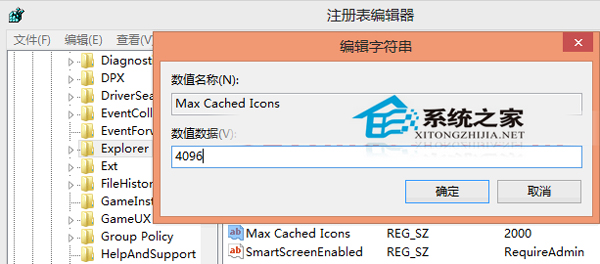
桌面檔案過多導致開機圖示顯示緩慢?修改註冊表擴大圖示快取可有效改善:
regedit
HKEY_LOCAL_MACHINE\SOFTWARE\Microsoft\Windows\CurrentVersion\Explorer
Max Cached Icons
4096
8192
擴大快取空間後,桌面圖示重繪速度明顯提升。習慣將檔案放桌面的用戶建議設定此值,平衡便利與效能。
Win10 預覽版磁碟機代號重複顯示?註冊表修復 .reg 檔一鍵解決
Windows 10 清除檔案總管「主頁」最近使用檔案與常用資料夾:設定法與註冊表法
Win10 環境下用 Win8.1 備份隨身碟還原報錯 0xc000000f 解決辦法
高手必備:Win10 Chkdsk 新增參數完整速查表(掃描、修復、效能、FAT/exFAT 支援)
Win10 內建放大鏡功能啟用與操作教學,方便視力不佳者使用
Windows 10 啟用內建系統管理員帳戶方法
Win10 通知改回 Win7 風格「氣球提示」:登錄修改一鍵完成
Win 10 USB 隨身碟連上電腦卻不顯示磁碟機代號?設定 → 裝置 → 移除裝置重新偵測