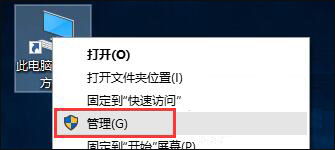
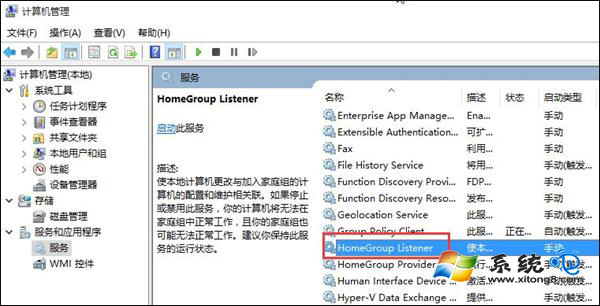
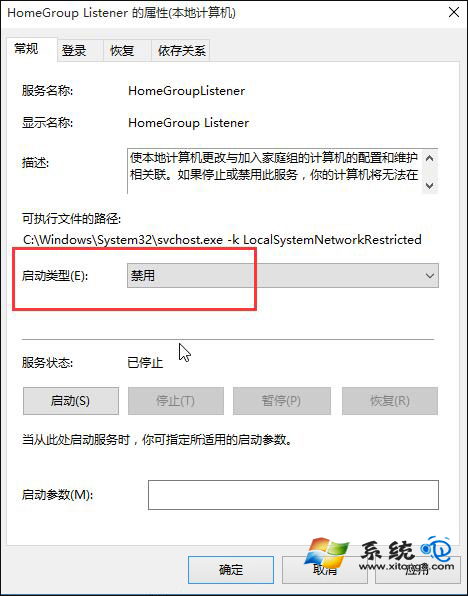
家庭群組方便區域網路內共享檔案與印表機,但若不常使用,其背景服務會持續佔用系統資源。本文教您透過服務管理工具停用 HomeGroup Listener 服務,輕鬆減輕系統負擔。
如未來需要共享功能,可依相同步驟將啟動類型改回「手動」或「自動」並重新啟動電腦即可恢復。
Win 10 將工作列搜尋按鈕改為搜尋列(解鎖註冊表)
Windows 10 雙系統安裝教學:Win10 + Win8.1 共存完整步驟 (含分區、NT6、UEFI/BIOS)
Windows 10 關閉 Windows Defender 內建防毒的完整步驟
Win 10 解析度無法調整?Windows Update 安裝顯卡驅動一鍵修復
Win10 藍屏錯誤 0x0000003B 解決方案:更新晶片組驅動與關閉快速啟動
Win10 HP 印表機驅動自動更新失敗 0x80240017 解決辦法
Win10 設定自動釋放未使用 DLL 加快系統回應:註冊表修改單一鍵值即可生效
Win 10 桌面右下角彈窗廣告怎麼關?msconfig 停用啟動項或 360 修復