工作列音量圖示點擊無反應、鍵盤音量鍵失效,常因登錄缺少 systray.exe 啟動項。新增字串值指向 C:\Windows\System32\systray.exe 即可修復。
regedit,瀏覽 HKEY_LOCAL_MACHINE\SOFTWARE\Microsoft\Windows\CurrentVersion\Run。systray.exe。C:\Windows\System32\systray.exe,確定。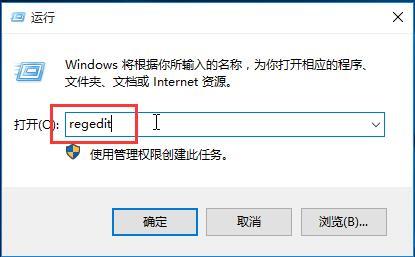
執行 regedit
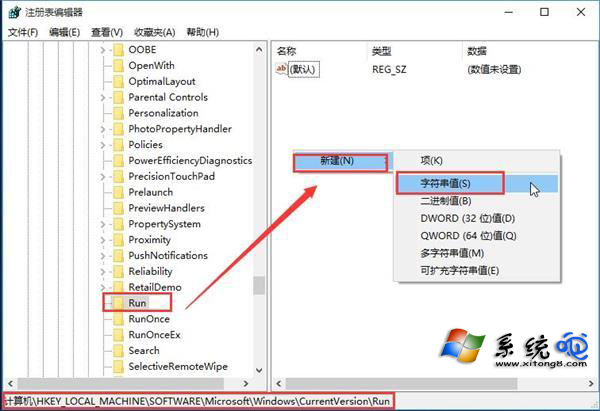
Run 登錄路徑新增字串值
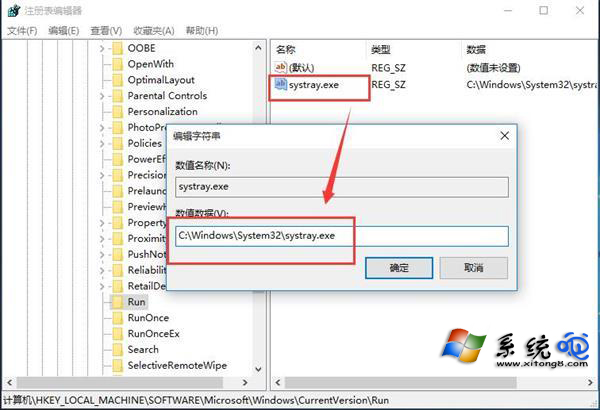
設定 systray.exe 路徑
若修改後仍無效,請至裝置管理員檢查聲音卡驅動程式是否正常,或重新安裝廠商提供的最新驅動。