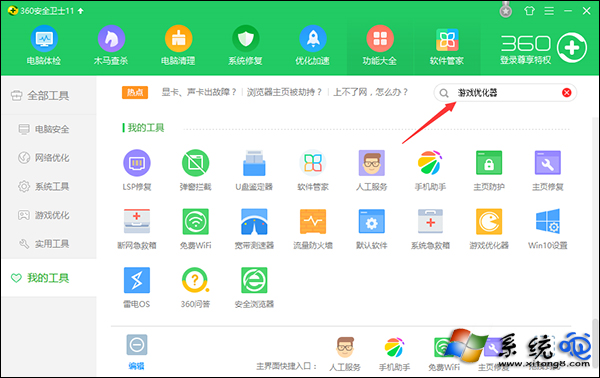
全螢幕遊戲中誤按 Win 鍵會跳出桌面,使用 360 安全衛士「遊戲優化器」功能可一鍵屏蔽左側 Win 鍵,遊戲結束後同介面可快速恢復。
360 安全衛士 - 更多工具
搜尋遊戲優化器
點擊優化屏蔽 Win 鍵
提醒:Win 鍵參與多種熱鍵組合(如 Win+E 開啟檔案總管),屏蔽前請確認不影響常用快捷鍵,或改用鍵盤實體開關(部分電競鍵盤提供)。
Win10 儲存空間:多硬碟組建儲存池,資料自動備份雙重保險
Win10 命令提示字元全面進化:支援複製貼上、自動換行、半透明、TrueType 字體
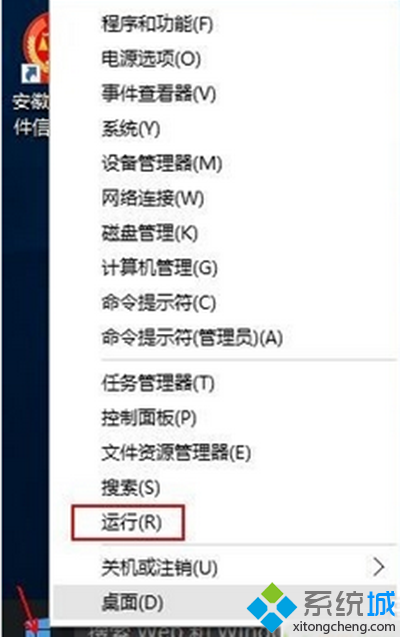
Win10「執行」命令在哪?三種最快打開方式
Win10無法卸載軟件提示權限不足?兩步解決管理員權限問題
Win10 開機黑屏時間長完整解決方案:更新獨顯驅動 + 關閉快速啟動 (含安全模式進入法)
Win10 Microsoft Store 無法安裝應用?wsreset.exe 一鍵重置快取修復
Win10 啟用「嘿 小娜」語音喚醒:Cortana 設定三步開啟免提互動
Win10 PowerShell 批次解除安裝內建應用:Get-AppxPackage | Remove-AppxPackage 一鍵淨化系統