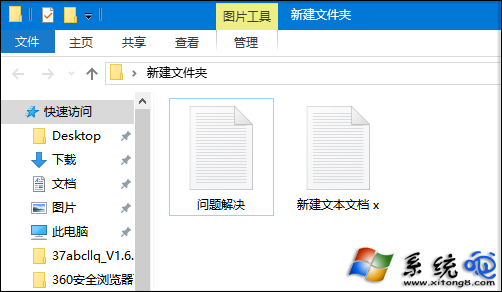
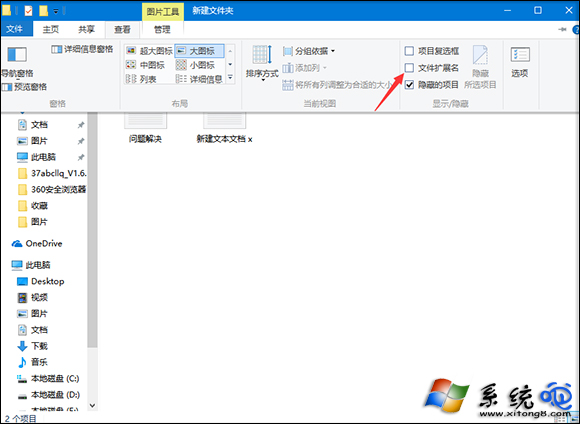
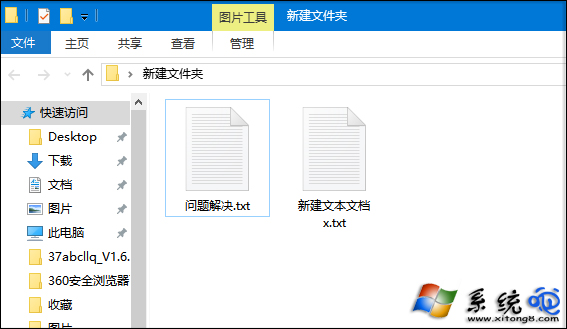
Windows 10 預設隱藏已知檔案類型的副檔名,修改檔案類型時極不方便。檔案總管「檢視」索引標籤提供直觀開關,一鍵顯示所有副檔名。
較 Windows 7 需進入「資料夾選項」多層選單,Windows 10 此操作大幅簡化,效率提升顯著。同介面亦可勾選「隱藏的項目」顯示隱藏檔案。
Win10 檔案總管顯示樹狀目錄:兩種方法啟用「展開到目前資料夾」
Win10 開始選單隱藏「最近開啟的程式」:任務列屬性一鍵關閉,保護隱私又清爽
Win10 內建 Windows Defender 病毒掃描:開始選單 → Windows 系統 → Windows Defender → 快速掃描
Win10 取消訂閱行事曆:清理多餘行事曆來源
Windows 10 控制台顯示所有項目教學:位址列下拉選單與檢視模式切換雙法
登錄編輯器快速跳轉技巧:HKEY_LOCAL_MACHINE 與 HKEY_CURRENT_USER 互通
Win10 修改預設應用程式:依類型/協定/應用程式設定
Win10 Mobile RS2 14905 更新內容:新精緻鈴聲設定、聲音設計統一化