Windows XP Windows 7 Windows 2003 Windows Vista Windows 綜合教學 Linux 系統教學
Windows 10 Windows 8 Windows 2008 Windows NT Windows Server 電腦軟體教學

Win10 修改登入介面背景執行 Login.ps1 失敗?PowerShell ISE 選取執行繞過限制

編輯:Windows 10 系統介紹

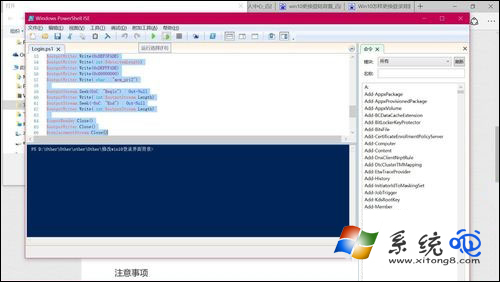
修改 Win10 登入畫面背景需執行 Login.ps1 腳本,直接右鍵「使用 PowerShell 執行」常因執行原則限制失敗。解決:右鍵 Login.ps1 → 「編輯」 → 在 PowerShell ISE 中全選腳本內容(Ctrl+A) → 按 F8 「執行選取內容」 → 成功套用登入背景。

操作技巧

  1. 右鍵 Login.ps1 選「編輯」而非「執行」。
  2. PowerShell ISE 視窗中按 Ctrl+A 全選。
  3. 按 F8 執行選取程式碼,繞過執行原則限制。

PowerShell ISE 執行選取

原理:PowerShell 預設 Restricted 執行原則禁止執行未簽名腳本;ISE 中「執行選取」屬互動式執行,不受此限制。修改完成後建議將執行原則改回 Restricted 維持安全。


Copyright © Windows教程網 All Rights Reserved