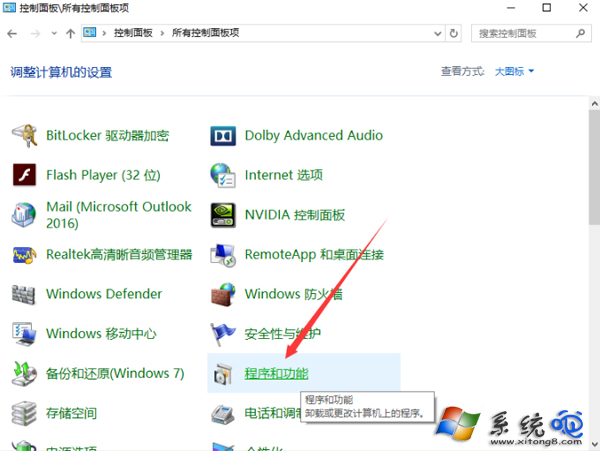
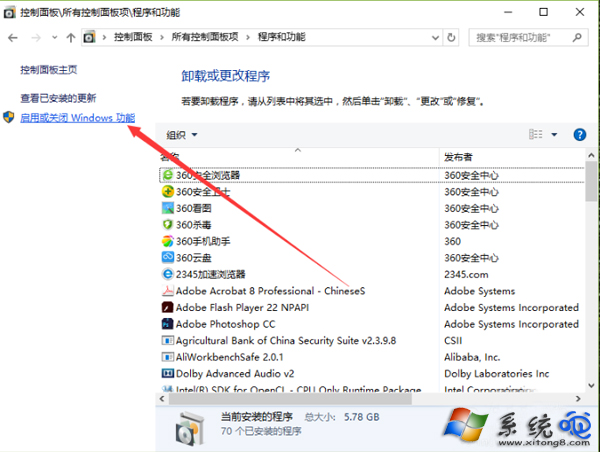
Win10 內建 IIS(網際網路資訊服務),需在「開啟或關閉 Windows 功能」中手動勾選啟用,適合本機網站開發測試。
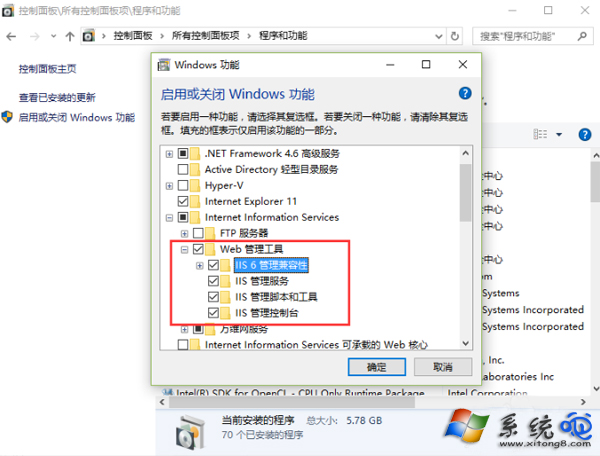
安裝完成後,瀏覽器輸入 https://localhost 即可看到 IIS 預設歡迎頁,開始部署本機網站。
Windows 10 關閉/設定自動更新:群組原則配置自動更新詳細步驟
Win8.1 一鍵升級 Win10 圖文教學:下載 ISO → 掛載 → setup.exe → 選擇保留/不保留 → 登入微軟帳號 → 體驗新系統
Win10 啟用「隱藏使用者安裝」:群組原則限制他人使用已安裝軟體
Win10 刪除圖示快取重建:%userprofile%\AppData\Local\Microsoft\Windows\Explorer 下 iconcache_*.db 全刪 + 批次檔自動化
筆記型電腦 Intel 核心顯示卡驅動安裝失敗解決方案:使用 Intel 官網舊版驅動 (14.8.29) 繞過相容性檢查
Win10 週年更新 (1607) UWP 應用閃退 (Twitter/Netflix 等)?wsreset 清除商店快取臨時修復
Win10 Build 9926 如何恢復 Build 9879 風格開始選單?登錄啟用 EnableXamlStartMenu 切換版本