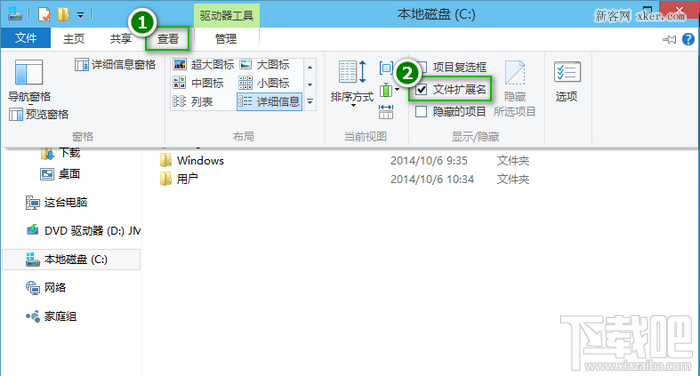
Windows 10 不再像舊版需進入「資料夾選項」,直接在檔案總管「檢視」頁籤勾選即可切換副檔名顯示,操作更直觀。
即時生效,無需重開機。修改副檔名時請謹慎,錯誤變更可能導致檔案無法開啟。
Win10 開始選單找不到控制台?兩種快速開啟方法
Windows 10 Build 10547 預覽版更新內容總覽
Win10 任務排程程式錯誤「任務物件版本不受支援」修復 (重複條目)
Win10 複製同名檔案不跳提示蓋寫?檔案總管選項取消「隱藏資料夾合併衝突」找回確認對話框
Win10 進入 UEFI 固件設定:設定 → 更新與安全性 → 復原 → 進階啟動 → UEFI 固件設定
Win 10 升級後桌面顯示異常?一鍵修復顯卡驅動輕鬆解決
Win10 桌面右鍵選單「新增」項目消失?修改註冊表 ContextMenuHandlers\New 恢復
Win10 新增語言包教學:切換繁體中文、英文等介面語言