操作步驟
- 「此電腦」→ 系統盤(通常 C:)→
Users\<用戶名>\Desktop → 右鍵「屬性」。
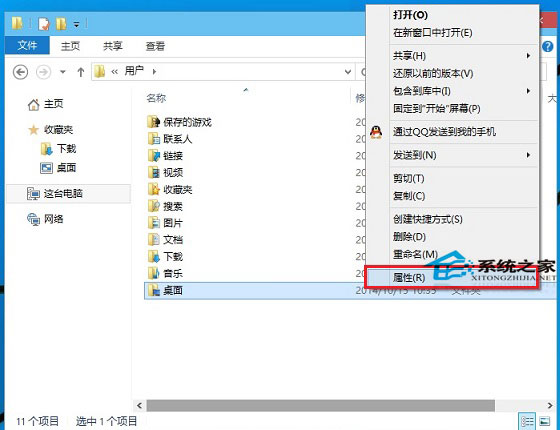
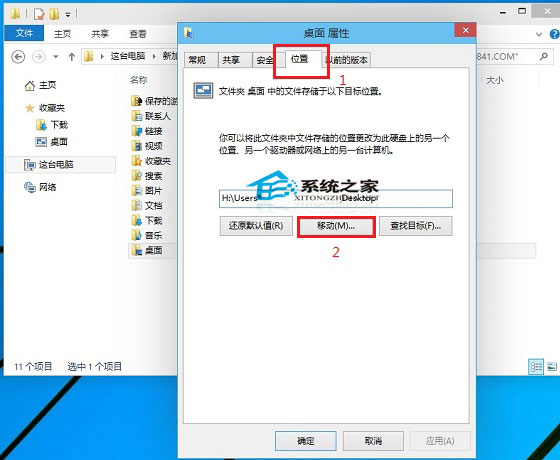
- 「位置」頁籤 → 「移動」。
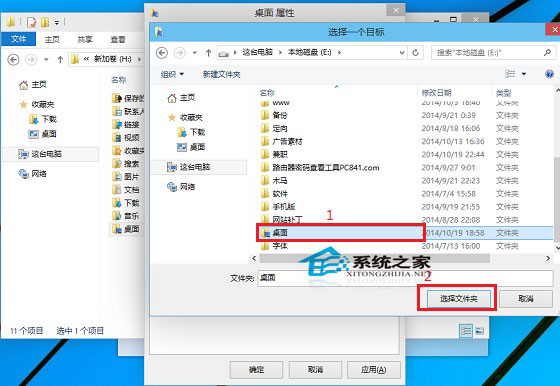
- 選擇目標非系統盤文件夾(如
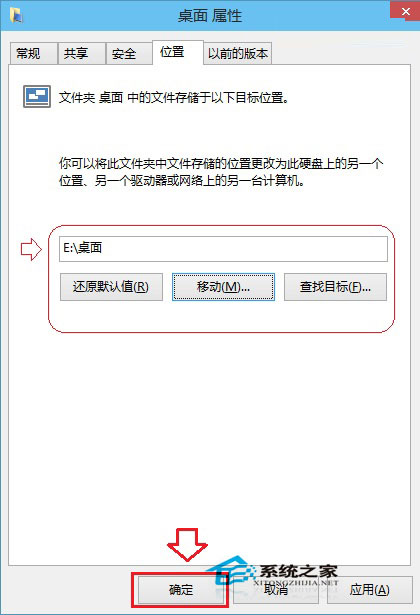
E:\Desktop,可預建或臨時新建) → 「選擇文件夹」 → 「確定」。
- 提示「移動現有文件?」選「是」 → 完成遷移。
收益
- 桌面習慣性存放大量文件不再佔用 C 盤空間,避免系統盤漲紅導致性能下降/更新失敗。
- 系統重裝/還原時桌面數據天然隔離,降低遺失風險。
- 多系統共用數據盤桌面可實現跨系統文件無縫訪問(需注意權限)。
注意
雙系統環境下操作前確認當前系統盤盤符(示例中 Win10 安裝在 H:,單系統通常為 C:)。