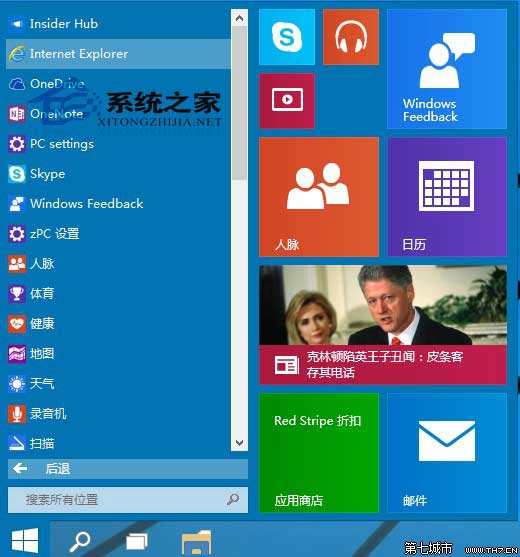
點擊「開始」→「所有應用」→ 列表中找到「Internet Explorer」點擊啟動。
按 Win+F 或點擊「開始」,搜尋框輸入 ie,搜尋結果即出現 IE 瀏覽器。
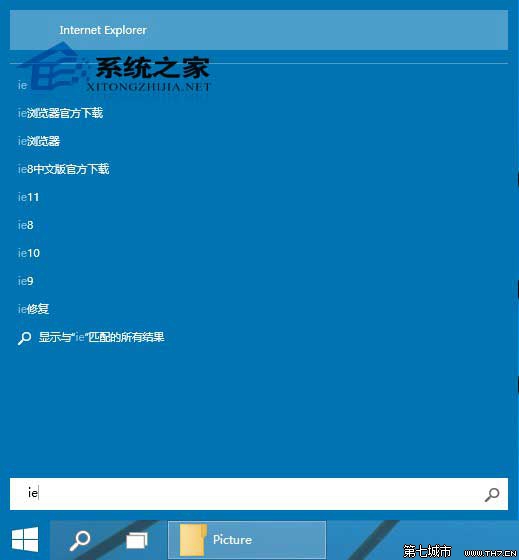
IE 並未移除,只是預設不釘選在工作列或開始選單主要區域,上述兩法均可快速找到。
Win10 Mobile RS2 14926 升級錯誤 0x800703ed 解決方案:移除 SD 卡重試安裝,官方承認無 100% 解法正在處理
Win10 內建遊戲錄製 Win+G 完整教學:Xbox Game Bar 錄製螢幕與遊戲畫面
Windows 10 當機死機怎麼辦?六種強制重啟與關機方案
Win10 藍屏 DPC_WATCHDOG_VIOLATION (0x00000133)?將 SATA 控制器驅動改為標準 AHCI 修復
Win10 Edge 瀏覽器隱藏設定 (about:flags) 完整指南:關閉 IE 相容提示、啟用 asm.js、重置旗標