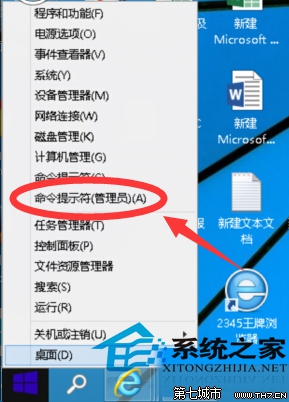
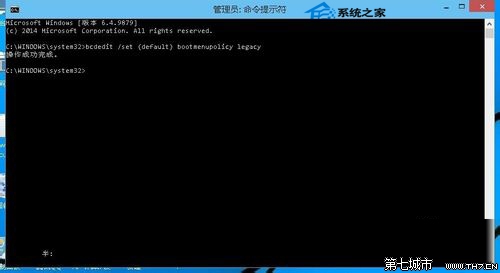
bcdedit /set {default} bootmenupolicy legacy
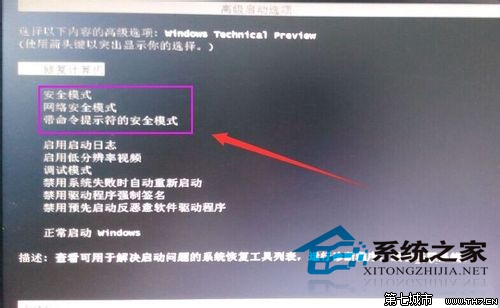
重啟電腦,反覆輕按 F8 鍵直到出現開機選單,使用方向鍵選擇所需的安全模式並按 Enter。
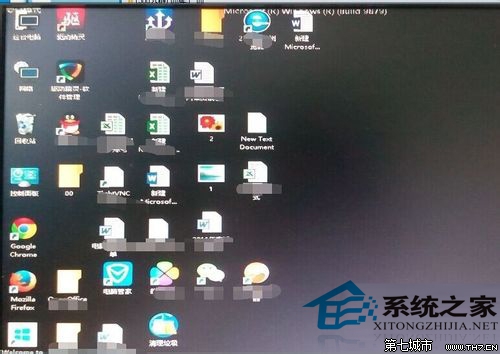
安全模式是修復系統故障的專用環境。若不想重啟,也可透過其他方式進入安全模式。
Windows 10 Mobile Build 10166 快速版開始推送:桌面/手機版本號終於同步
Windows 10 照片檢視器圖片背景發黃怎麼辦?螢幕解析度設定裡校正色彩設定檔
Win10 搜尋功能失效?重建索引快取修復設定/工作列搜尋
Win10 停用 App 背景執行:設定→隱私權→背景應用程式→關閉不需背景執行的 App
Windows 10 應用商店裝置上限 10 台?教你移除舊裝置繼續安裝新裝置
Win10 無法識別 USB 裝置?三大修復方案
Win10 TH2 升級錯誤 0xC1900101 解決:移除顯卡驅動重試
Win10 右鍵選單消失「設定可切換顯示卡」?regsvr32 修復或乾淨重裝顯卡驅動