Windows XP Windows 7 Windows 2003 Windows Vista Windows 綜合教學 Linux 系統教學
Windows 10 Windows 8 Windows 2008 Windows NT Windows Server 電腦軟體教學

Win10 9926 無法存取路由器掛載硬碟?登錄新增 AllowInsecureGuestAuth=1 開啟不安全來賓存取

編輯:Windows 10 系統介紹

升級 9926 後無法開啟路由器共享硬碟(甚至管理員帳號也不行),因新版安全策略預設封鎖不安全的來賓存取。修改登錄即可解除限制。
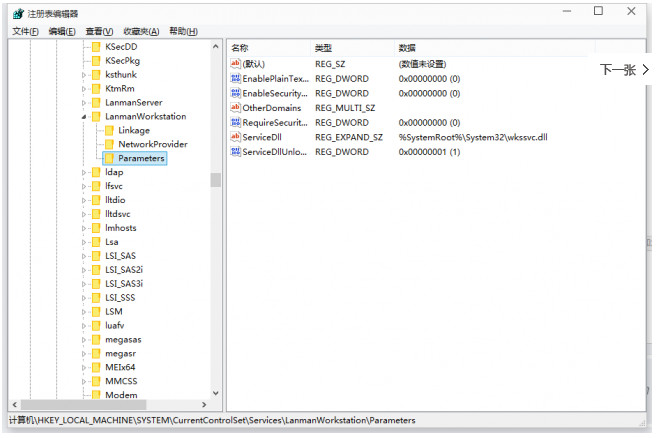
修復步驟

  1. Win+R → regedit 開啟登錄編輯器。
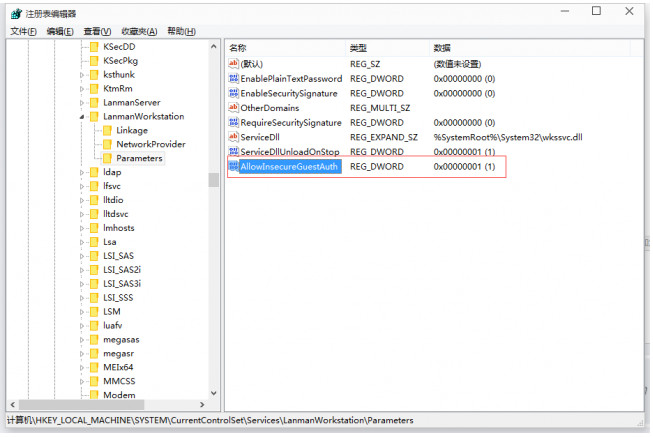
  2. 定位至:HKEY_LOCAL_MACHINE\SYSTEM\CurrentControlSet\Services\LanmanWorkstation\Parameters
  3. 右側空白處新建 DWORD (32 位元) 值,命名 AllowInsecureGuestAuth,數值設為 1。
  4. 重開機或重啟 Workstation 服務生效。

此值允許 SMB 客戶端進行不安全的來賓認證,恢復對舊版 NAS、路由器共享的相容性。注意:會降低網路安全性,僅建議信任的區域網路環境使用。

Copyright © Windows教程網 All Rights Reserved