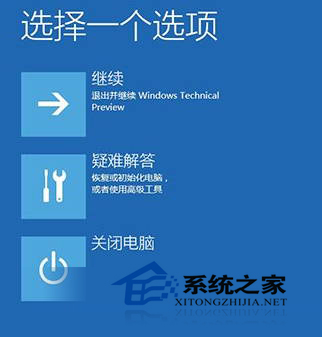
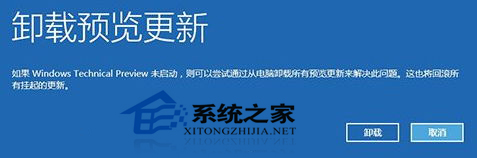
安裝更新後出現系統頻繁崩潰、應用程式相容性變差,可進入 Windows 恢復環境 (WinRE) 解除安裝最近更新:
此功能為預覽版專屬,正式版亦保留類似「解除安裝更新」選項於「設定」→「更新與安全性」→「Windows Update」→「檢視更新歷程記錄」→「解除安裝更新」。
Windows 10 快速開啟登錄編輯器:Win+R 輸入 Regedit 最速達
Win10「此電腦」中多餘的裝置與磁碟圖示怎麼刪除?註冊表一鍵清除第三方項目
Win10 如何開啟本機安全性原則?控制台與執行命令兩種方法
Win10 命令提示字元設定半透明視窗:隱藏在屬性「色彩」頁籤的不透明度調整
Windows 清除 DNS 快取指令 ipconfig /flushdns 完整教學 (含替代法:停用/啟用網卡)
Win10 應用商店快取損壞?卸載重裝 + 移除 360 安全軟體徹底修復
Windows 10 透過 Windows Update 升級系統教學:設定應用程式與控制台雙管道
Win10 升級缺少 boot.wim 失敗怎麼辦?複製 $Windows.~BT 手動安裝救援法