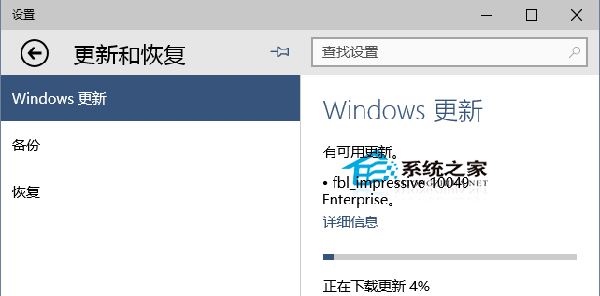
Win10 預覽版預設自動安裝新推送版本,可透過注冊表阻擋特定版本自動升級 (需逐版本設置)。
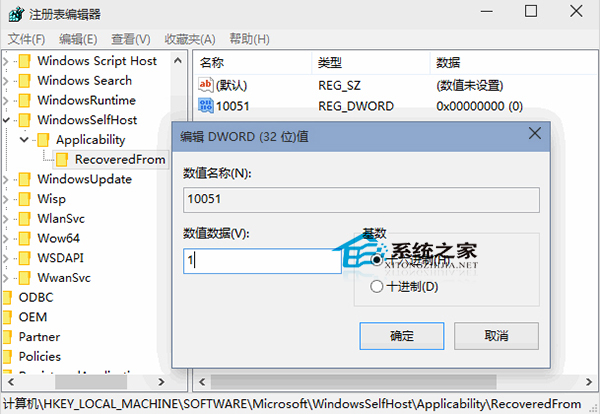
regedit
HKEY_LOCAL_MACHINE\SOFTWARE\Microsoft\WindowsSelfHost\Applicability\RecoveredFrom
RecoveredFrom
10049
1
刪除對應版本號的 DWORD 值即可。
Win10 10102 設定 IE 瀏覽器檔案關聯:修復無法開啟 HTML 檔案
Win10 如何關閉應用商店自動更新?三步驟停用背景下載節省頻寬
Windows 10 發售時間與版本價格總整理 (7 大版本、OEM 價格、新蛋洩露資訊)
Win10 多重桌面(虛擬桌面)使用教學:建立、切換、移動視窗全攻略
Win10 防止更新自動重開機:登錄 NoAutoRebootWithLoggedOnUsers=1
Windows 10 Microsoft Store 無法下載應用:四種修復方案從輕到重徹底解決
Win10 相機照片/視頻默認保存路徑與自定義修改:屬性→位置→移動三步走
Win 10 螢幕解析度無法調整?透過 Windows Update 更新顯示卡驅動程式解決