Windows 10 Microsoft Store 預設以視窗模式運行,不同於 Windows 8 全螢幕體驗。若偏好沉浸式全螢幕瀏覽(尤其平板模式),可一鍵切換。
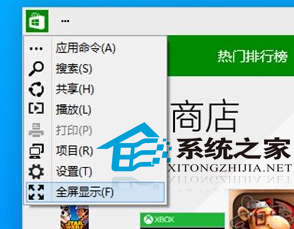
補充:此設定僅對當前啟動生效,下次開啟預設仍為視窗模式。Windows 10 後續版本 (1703+) 於設定 → 系統 → 平板電腦模式 中提供「登入時自動進入平板模式」,配合平板模式下 Store 自動全螢幕,體驗更連貫。
Win10 預覽版 10 大使用技巧:關閉同步、啟用 Cortana、快速通道、新 Office/音樂/視頻、固定設定、回收空間、自定義資源管理器、OneDrive 設置、反饋建議、回滾版本
Win10 升級檢測「使用者帳戶類型不支援」?域帳號解決方案
Win10 磁碟檢查結果怎麼看?事件檢視器篩選事件 ID 26226 查看詳細日誌
Win10 不重啟直接進入安全模式:系統設定 msconfig 勾選安全開機法
Win10 升級提示「網卡不支援 Windows 10」?手動安裝官方驅動 + 原版 ISO 升級繞過檢測