Win10 睡眠/待機喚醒後 WiFi 斷線且無法重新連線,主因是網卡進入省電模式未正常恢復。可透過裝置管理員停用「允許電腦關閉此裝置以節省電源」。
快速修復(臨時)
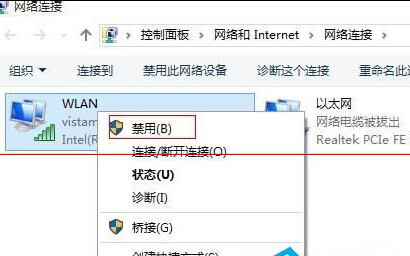
- 右鍵工作列 WiFi 圖示 → 【開啟網路與網際網路設定】→ 【變更介面卡選項】。
- 右鍵無線網卡 → 【停用】→ 再【啟用】,通常能暫時恢復連線。
永久解決(停用省電管理)
- 同上進入無線網卡【內容】→ 【設定】按鈕。
- 切換至【電源管理】索引標籤。
- 取消勾選【允許電腦關閉此裝置以節省電源】,按【確定】。
操作前請確認無線基地台/路由器運作正常。此設定可防止睡眠喚醒後網卡無法重新初始化。