Windows 10 右下角彈出廣告通常由 HyFamily 進程引起,可透過工作管理員結束該進程暫時停止廣告。
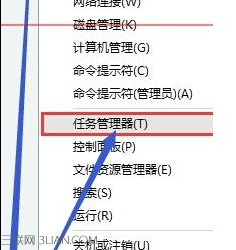
注意:此為暫時方案,重開機後進程可能重啟。根治建議檢查啟動項目、排程工作、瀏覽器擴充套件,或使用防毒軟體掃描廣告軟體。
Win10 開機黑屏時間長?關閉鎖定畫面 + 硬體檢查雙管齊下
Win 10 驅動程式備份與還原:DISM 指令匯出/匯入 INF 格式驅動
Win10 虛擬機無法上網?VMware 橋接模式 + 靜態 IP 完整設定教學
Windows 10 內建 Windows Defender 啟用與掃描教學
Windows 10 安裝 Office 365 / 2016 無回應解決:結束程序重裝、我的 Office 帳戶頁操作
Win10 Build 10568 更新內容:底層修復與效能提升為主,介面無明顯變化
Win10 預覽版 14251 已知問題匯總:WSClient.dll 錯誤、操作中心連線按鈕消失、記憶體管理導致應用崩潰