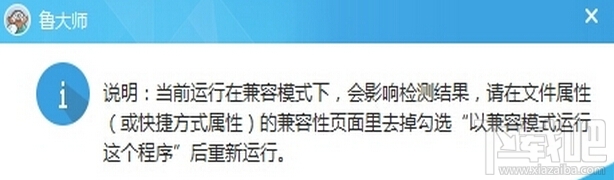
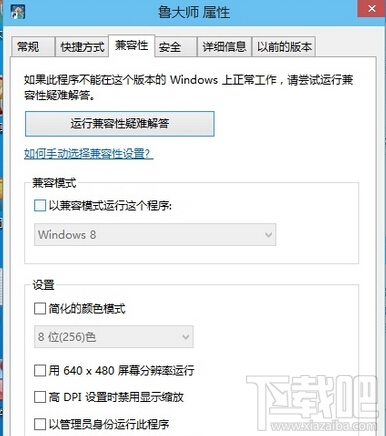
Windows 10 執行 魯大師 提示相容性問題無法啟動,調整相容模式設定即可修復。
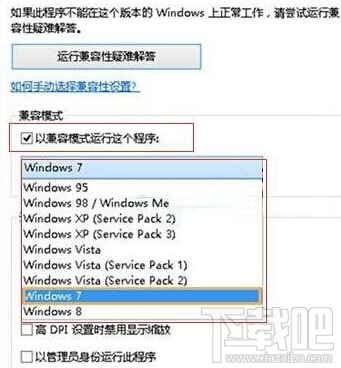
先取消再重新設定相容模式可重置應用程式相容性資料庫中的快取記錄,避免舊設定干擾。Windows 7 模式相容性最佳,次選 XP SP3。
同法適用於 AIDA64 舊版、CPU-Z 舊版、GPU-Z 舊版等硬體偵測軟體在 Windows 10 上的相容性問題。
Windows 10 查看硬碟讀寫速度:工作管理員→效能→磁碟即時監控
Win10 程式屬性缺少「相容性」索引標籤?群組原則恢復顯示
Win10 一鍵清除開始選單所有動態磚訊息:登錄檔 ClearTilesOnExit 完整教學
Win10 驅動程式下載安裝技巧:使用驅動人生一鍵更新
Win10 搜尋功能失效?重建索引快速修復
Win10回退Win8/Win7完整教程:系統還原功能一鍵降級保留檔案
Win10 提示「IME 已停用」無法輸入中文怎麼辦?執行 SFC 掃描或升級新版本修復
升級 Windows 10 正式版保留哪些檔案?各版本升級保留內容差異說明