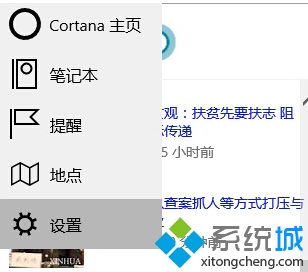
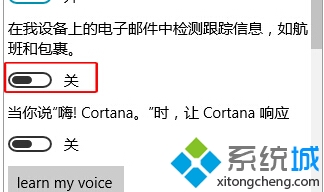
Cortana(小娜)預設會掃描裝置郵件偵測航班、包裹等追蹤資訊,若重視隱私可關閉此功能。
關閉後小娜不再主動從郵件擷取行程、物流資訊,相關提醒卡片不再出現,但語音指令、搜尋等核心功能不受影響。
Win10 C 槽空間暴增主因:FileRepository 驅動備份膨脹
Win10 螢幕亮度無法調整?修改登錄 KMD_EnableBrightnessInterface2 修復
Win10 如何讓 QQ 聊天視窗不合併顯示?工作列設定「永不合併」獨立顯示每個對話視窗
VMware Fusion 8 安裝 Windows 10 虛擬機器完整圖文教學
Win10 定位功能無法開啟?啟用 Geolocation Service 服務恢復位置服務
Win10 Edge 瀏覽器如何設定分頁預覽?登錄調整延遲時間或關閉功能
Win10 快速切換至桌面的兩大絕招:任務列按鈕與 Win+D 快捷鍵
Windows 10 正式版 ISO 下載與安裝教學:微軟官方管道取得原版映像