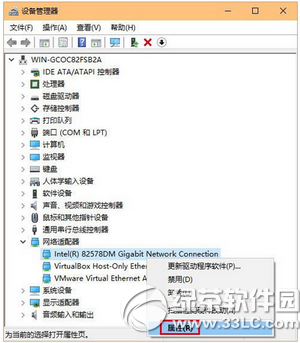
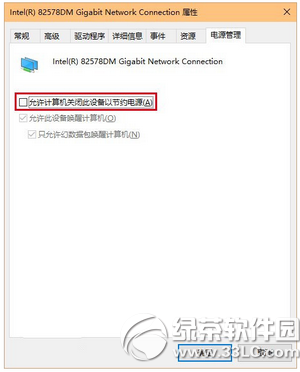
排除路由器、ISP 故障後,Win10 升級後斷網多半是網卡電源管理預設「允許電腦關閉此裝置以節省電源」導致。關閉即可穩定。
若仍斷線,嘗試:更新網卡驅動、重設網路 (Win+X → 「網路連線」→ 「網路重設」)、或執行「疑難排解」(工作列網路圖示右鍵)。
Win10 開機記憶體佔用過高?匯入登錄檔關閉 TimeBroker 與 SysMain
Win10 應用商店閃退、小娜無反應?啟用「網路清單服務」一招解決
Win10 系統音效檔案位置、提取與靜音設定全攻略
安裝 Win 10 時跳過 Microsoft 帳號,直接建立本地帳號
Win10 Spartan (Edge 早期版) 瀏覽器如何清理快取?設定中三步驟刪除歷史/ Cookie/ 暫存檔
Win 10 開啟 Excel 2010 顯示中文亂碼?CSV 編碼轉 ANSI 格式解決
Win10 攝影機打不開怎麼辦?檢查驅動程式與隱私權設定雙管齊下
Windows 10 C 槽空間不足?磁碟清理勾選系統檔案可釋放大量空間