補丁儲存路徑
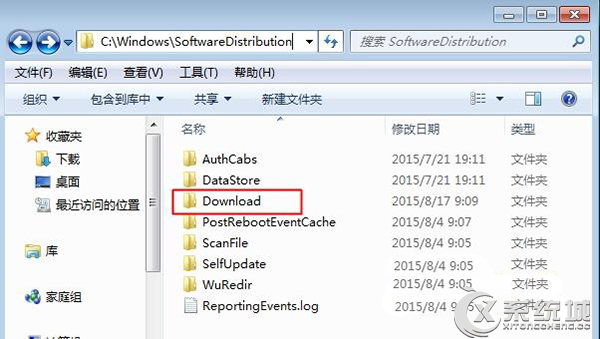
Windows Update 下載的更新文件預設儲存於:
C:\Windows\SoftwareDistribution\Download
操作步驟
- 開啟「此電腦」→ 進入 C 盤。
- 依路徑展開:
Windows → SoftwareDistribution → Download。
- 此資料夾內即為已下載的更新補丁,可手動刪除以釋放空間(刪除後 Windows Update 會重新下載)。
注意
- 刪除前建議先備份或確認系統穩定,避免刪除關鍵更新導致無法安裝。
- 亦可使用「磁碟清理」→「清理系統文件」→ 勾選「Windows 更新清理」來安全移除。