Windows XP Windows 7 Windows 2003 Windows Vista Windows 綜合教學 Linux 系統教學
Windows 10 Windows 8 Windows 2008 Windows NT Windows Server 電腦軟體教學

Win10 桌面圖示位置排列無法記憶?註冊表修復 InProcServer32

編輯:Windows 10 系統介紹

部分 Win10 使用者遭遇每次登入桌面圖示都會重新排列、位置無法記憶。原因通常是 InProcServer32 登錄值被第三方殼擴充套件劫持。修正該值為系統預設即可恢復。

修復步驟

  1. Win+R → regedit 開啟登錄編輯器。
  2. 依系統位元數定位以下機碼,並取得「Administrators」群組「完全控制」權限:
    32 位元: HKEY_CLASSES_ROOT\CLSID\{42aedc87-2188-41fd-b9a3-0c966feabec1}\InProcServer32
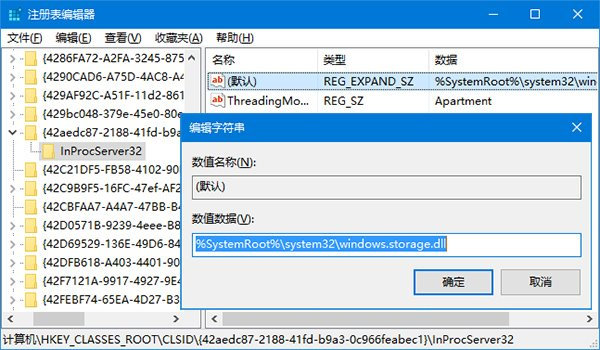
    64 位元: HKEY_CLASSES_ROOT\Wow6432Node\CLSID\{42aedc87-2188-41fd-b9a3-0c966feabec1}\InProcServer32

InProcServer32 註冊表權限與數值

  1. 雙擊右側「(預設)」值,將數值資料修改為:
    %SystemRoot%\system32\windows.storage.dll
  2. 確定、關閉登錄編輯器,重新啟動電腦。
原理: 該 CLSID 對應「Shell Folder」處理桌面命名空間。數值被修改為第三方 DLL 導致桌面圖示狀態無法正確寫入/讀取。恢復為 windows.storage.dll 即修正殼擴充劫持問題。
Copyright © Windows教程網 All Rights Reserved