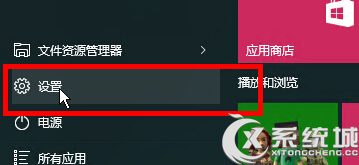
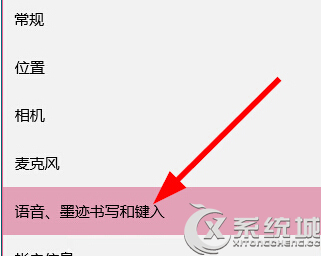
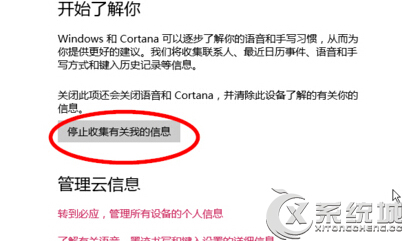
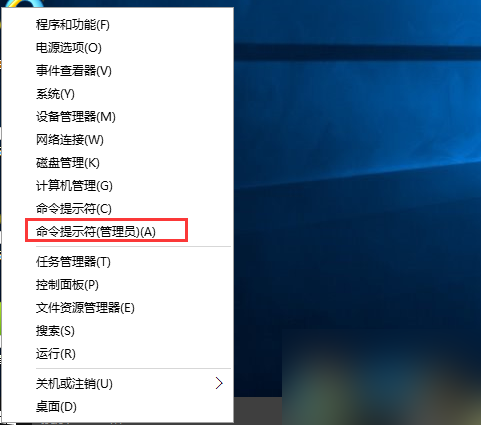
Cortana(小娜)為了提供精準建議,預設會收集語音、手寫、輸入習慣等個人資料。若重視隱私,可依下列步驟關閉收集功能:
完成後,Cortana 將不再上傳您的語音、筆跡、鍵盤輸入資料至雲端分析。注意:關閉後部分個性化功能(如語音辨識精準度)可能下降,但隱私保護更完善。
Win10 滑鼠游標太小看不清?輕鬆調大指標尺寸
Win10 開始功能表「登出」在哪裡?
Win10 開始功能表點擊無反應?兩種修復方案
Win10 硬碟安裝教學:軟媒魔方「硬碟裝機」工具、ISO 掛載、免 USB 乾淨安裝全過程
Windows 10 藍屏 0x0000003B 怎麼辦?驅動更新與電源管理調整完整教學
Windows 10 移動「我的文件」等使用者資料夾至 D 槽釋放 C 槽空間
Windows 10 ESD 映像檔轉 ISO 完整教學:使用 Dism++ 工具一鍵轉換
Win10 關閉自動維護教學:工作排程器停用 Microsoft\Windows\TaskScheduler\TaskScheduler 任務 (附自動維護功能說明)