除了圖形介面,Windows 10 也可透過命令列工具 netsh 快速設定靜態 IP,適合自動化腳本、遠端管理或偏好鍵盤操作的用戶。以下為完整指令流程。
cmd,按 Ctrl+Shift+Enter 以系統管理員身分開啟命令提示字元。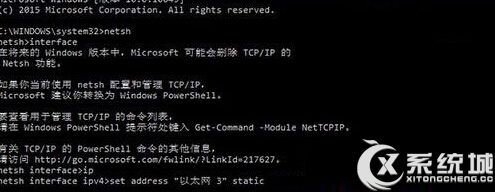
netsh interface ipv4 show config記下介面名稱(如「乙太網路」或「Wi-Fi」)、目前 IP、子網路遮罩、閘道。
netsh interface ipv4 set address name="乙太網路" static 192.168.1.110 255.255.255.0 192.168.1.1netsh interface ipv4 set dns name="乙太網路" static 8.8.8.8 primary
netsh interface ipv4 add dns name="乙太網路" 8.8.4.4 index=2netsh interface ipv4 show config "乙太網路"netsh interface ipv4 set address name="乙太網路" dhcp 並 netsh interface ipv4 set dns name="乙太網路" dhcp。interface 指令輸入後再輸入 IP 的描述不準確,正確語法請參考上方 netsh 指令。