Win10 右鍵選單「新增」子選單消失,因登錄表 HKEY_CLASSES_ROOT\Directory\Background\shellex\ContextMenuHandlers\New 預設值被修改/刪除。恢復預設 GUID 即可修復。
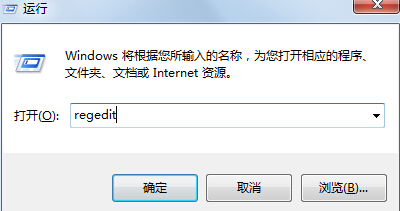
regeditHKEY_CLASSES_ROOT\Directory\Background\shellex\ContextMenuHandlers\New{D969A300-E7FF-11d0-A93B-00A0C90F2719}原理: 此 GUID 對應「新增」選單的 Shell 擴充處理器。第三方優化工具、安全軟體清理、登錄表損毀可能導致此值遺失或錯誤。修復後右鍵「新增」恢復資料夾、文字文件、Word 文件、捷徑等完整建立選單。
Win10 Mobile 10240 模擬器安裝與使用教學:Hyper-V 環境需求與虛擬機建立流程
Win10 執行 WPS 2016 無回應?更新顯卡驅動 + 關閉硬體圖形加速解決
Win7 完美移植 Win10 登錄界面:兩步替換系統文件+修改背景圖
Win10 瀏覽器暫存資料夾無法更改位置?登錄表修改 User Shell Folders Cache 鍵值解決
Win10 查詢 DNS 伺服器位址:命令列 ipconfig /all 與網路介面卡詳細資訊兩種方法
Windows 10 官方零售版價格公布:家用版 119 美元、專業版 199 美元