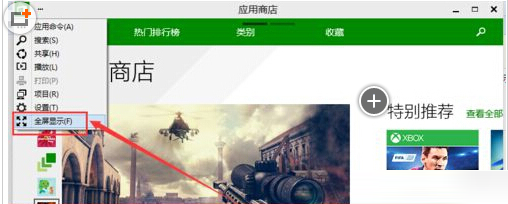
Microsoft Store 預設視窗模式,最大化非全螢幕。點擊右上角「...」選單選擇「全螢幕」即可切換沉浸式瀏覽體驗。
全螢幕模式下隱藏標題列與工作列,適合平板模式或大螢幕瀏覽應用。再次點擊「...」→「離開全螢幕」可恢復視窗模式。快捷鍵 Win+Shift+Enter 亦可切換 UWP 應用全螢幕狀態。
Win10 關閉 Snap 視窗自動靠邊/分屏功能 (登錄一鍵禁用)
Windows 10 安裝 Python 完整圖文教學:從官網下載到環境變數設定
Win10 正式版如何開啟毛玻璃/亞克力透明效果?Aero Glass 10240 工具一鍵實現窗口透明、顏色、光照自訂
Win10 必應輸入法無法使用?ctfmon 指令啟用輸入法框架完整功能評測
微軟官方推薦:Windows 10 專屬頭像線上產生器
Win10 設定桌面背景自動輪播(投影片播放)完整步驟
升級 Win10 RTM 正式版 C 槽空間不足的官方解決方案
IE11 將網站加入「應用程式檢視」:齒輪選單→將網站加入應用程式檢視→開始選單即見捷徑