想對著電腦說聲「你好小娜」就喚醒語音助手?Win10 內建的 Cortana(中文版稱「小娜」)支援語音喚醒,只需在設定中開啟並確保麥克風正常即可。以下是完整設定步驟。
開啟語音喚醒功能
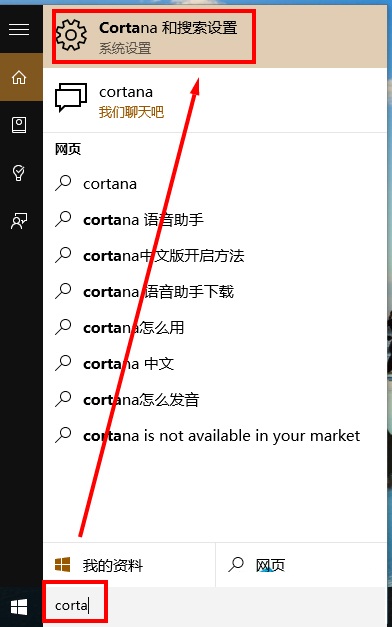
- 在工作列搜尋框輸入「Cortana」,點擊「Cortana 與搜尋設定」。
- 在設定頁面找到「你好小娜」選項,將開關切換為「開啟」。
- 確保已登入 Microsoft 帳號,且麥克風裝置運作正常。
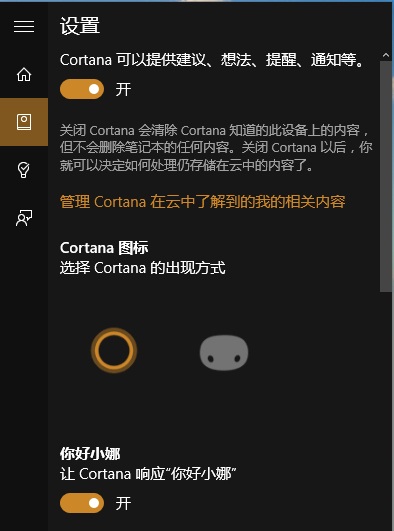
喚醒關鍵字
- 中文:「你好,小娜」
- 英文:「Hey, Cortana」
常見問題排查
- 若喚醒無反應,請檢查「設定」→「隱私權」→「麥克風」是否允許應用程式存取。
- 部分舊版驅動可能導致語音辨識失效,建議更新音訊驅動程式。
- 企業版/教育版若由群組策略禁用 Cortana,則無法使用此功能。
啟用語音喚醒後,你可以直接說出指令查詢天氣、設定提醒、開啟應用等,解放雙手,提升效率。